A WooCommerce crypto payment plugin does one of two things. It sends the buyer’s money straight to a wallet you own, or it sends the buyer to a page run by a company that sits between you and the money. This page compares seven plugins of both kinds: StayCrypto, ZeroBeep, VelozaPay, CryptoPay, Paymento, Clearqo and Blipply. Every fact about the six plugins that are not ours comes from the plugin’s own page, checked on 25 October 2026.
A note on bias: StayCrypto is our own plugin. We describe it from its own readme, the same way we describe the others, and we say where it falls short. It is not in the WordPress.org directory yet. We also did not install or test any of these plugins. This is a comparison of what each maker publishes, and “the maker says” means we could not check the claim ourselves.
The short answer
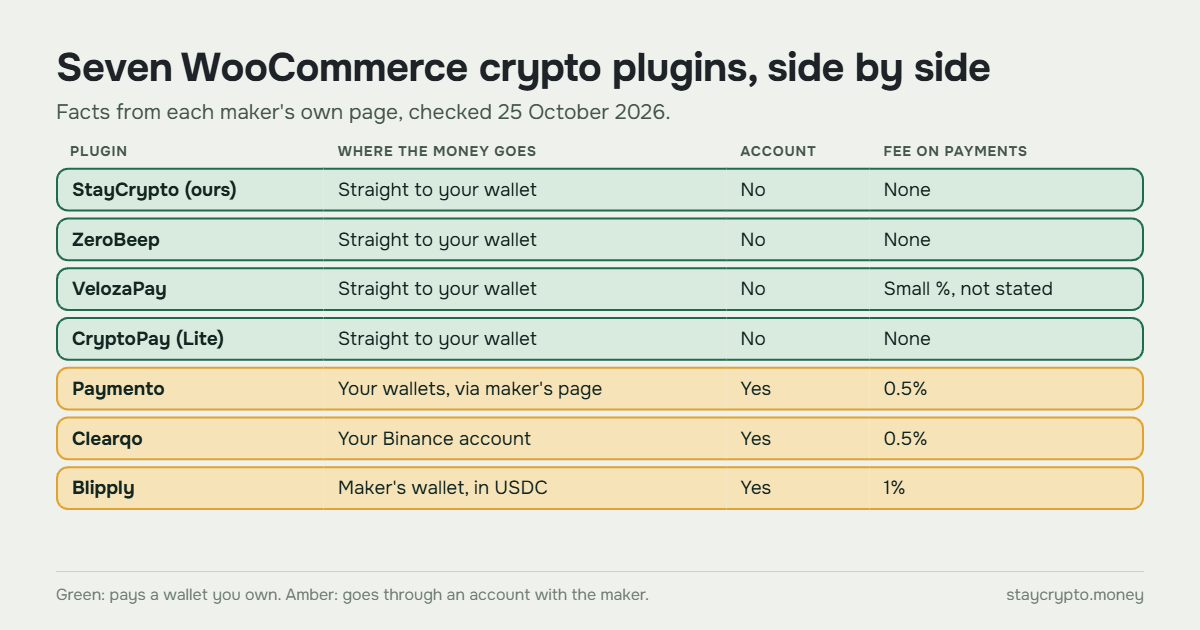
- If you want your own wallet, no account and no fee from the plugin, look at the four plugins that pay you directly: StayCrypto, ZeroBeep, CryptoPay and VelozaPay (VelozaPay takes a small fee).
- If you want a hosted payment page run by a company, Paymento, Clearqo and Blipply do that for 0.5% to 1% of each payment.
- If your money already sits on Binance, Clearqo is built for that.
None of them is best for everyone. The sections below show what each one asks of you.
How we compared the WooCommerce crypto payment plugins
We asked the same five questions about every plugin. Who holds the money? Do you need an account with the maker? What does it cost? Which coins and networks does it support? How established is it? Install counts and reviews come from each plugin’s WordPress.org page, so they say little about quality and a lot about how new a plugin is. Prices and features change, so check the maker’s page before you decide.
Side by side
| Plugin | Where the money goes | Account with the maker | Fee | Coins and networks | Installs on WordPress.org |
|---|---|---|---|---|---|
| StayCrypto (ours) | Straight to your wallet | No | None | USDT and USDC on BNB Chain, Polygon and Ethereum; USDT on Tron | Not listed yet |
| ZeroBeep | Straight to your wallet | No | None (Pro add-on is paid) | BTC, LTC, ETH; USDT on Tron, Ethereum and BNB Chain | Fewer than 10 |
| VelozaPay | Straight to your wallet | No | Small percentage, rate not stated | BTC, ETH, USDT, USDC, SOL, LTC, DOGE, BCH, POL | 10+ |
| CryptoPay (Lite) | Straight to your wallet | No | None on payments (paid Premium and add-ons) | 5 EVM networks free; Bitcoin, Solana and Tron need add-ons | 70+ |
| Paymento | Your wallets, through the maker’s payment page | Yes | 0.5% | BTC, ETH, USDT (ERC-20, TRC-20) and others | 90+ |
| Clearqo | Your Binance account | Yes (Clearqo and Binance) | 0.5%, minimum 0.01 USDT | USDT only: Binance Pay, TRC-20, BEP-20 | Fewer than 10 |
| Blipply | The maker’s wallet, settled in USDC | Yes | 1% | Hundreds of coins, settled as USDC | Fewer than 10 |
Two kinds of WooCommerce crypto payment plugin
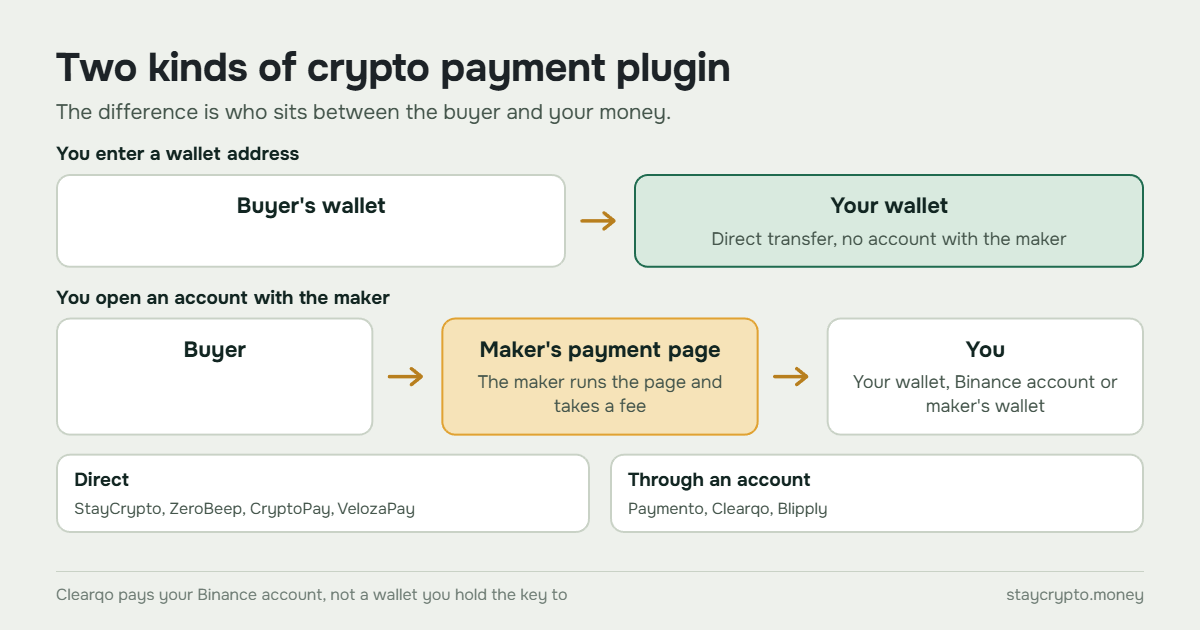
With the first kind, you type a wallet address into the settings and buyers pay that address. There is no account to open and the plugin has no one to pay. StayCrypto, ZeroBeep, CryptoPay and VelozaPay work this way. They differ in how they notice the payment: StayCrypto and ZeroBeep read the blockchain themselves, CryptoPay has the buyer connect a wallet, and VelozaPay creates payments through its own API.
With the second kind, you open an account with the maker, and the buyer is sent to a page the maker runs. That costs a fee, usually a percentage of each payment, and the plugin depends on the maker’s service staying online. In return you get a ready-made payment page and a company you can contact. Paymento, Clearqo and Blipply work this way. Clearqo is a middle case: the money goes to your own Binance account, not to a wallet you hold the key to.
Plugins that pay your wallet directly
StayCrypto (ours)
StayCrypto takes USDT and USDC on BNB Chain, Polygon and Ethereum, and USDT on Tron. You enter your wallet address, buyers pay the exact amount shown (each order gets a unique decimal tail), and the plugin finds the transfer on the blockchain and completes the order. A payment that does not match any order is not credited on its own: you get a notice and decide. Telegram notifications are optional. Only a site administrator can change the wallet address. Plugin page: StayCrypto.
Pros
- No account, no fee from the plugin, no server of ours between buyer and wallet.
- USDC and Polygon are included from the start.
- Unmatched payments wait for your decision instead of being guessed.
Cons
- Stablecoins only, on four networks. No Bitcoin, Solana or native coins.
- Not in the WordPress.org directory yet, so there are no public install counts or reviews.
- Needs the PHP extension bcmath and a working cron on your hosting, and matches payments by amount, so unrelated transfers to the same address make records harder to read.
ZeroBeep
ZeroBeep Crypto Gateway for WooCommerce is a free, non-custodial plugin. The maker says buyers pay your address directly, and the plugin checks the payment against public blockchain nodes, with a confirmation depth you set. Each order gets a slightly different amount, and you can allow an underpayment of 0% to 5%. The paid Pro add-on adds Polygon, Solana, Monero, Base, Arbitrum, Lightning and more. Plugin page: ZeroBeep on WordPress.org.
Pros
- No account, no API key and 0% platform fee, according to the maker.
- Bitcoin and Litecoin are available next to ETH and multi-chain USDT.
- A tolerance setting for small underpayments.
Cons
- Version 1.0.0, published on 30 September 2026, by one author, with fewer than 10 installs and no reviews.
- USDC is not listed, and Polygon is only in the paid Pro add-on, whose price is not published.
- No Telegram notifications are mentioned.
VelozaPay
VelozaPay: Crypto Payments for WooCommerce is free to install. The maker says payments go to your wallet on-chain and that it never holds funds or private keys. The payment page runs on your own store, but payments are created through the maker’s API. It lists BTC, ETH, USDT, USDC, SOL, LTC, DOGE, BCH and POL, with USDT in five networks and USDC in five. No sign-up or KYC is needed. Plugin page: VelozaPay on WordPress.org.
Pros
- Wide choice of coins and networks, including USDT and USDC on Polygon.
- No account, no KYC, no monthly fee.
- The buyer stays on your domain.
Cons
- A percentage fee applies to each payment, and the page does not state the rate.
- Each coin has a minimum payment amount, which the page does not list.
- Payment creation goes through the maker’s API, so the plugin depends on that service. 10+ installs and one review so far.
CryptoPay (BeycanPress), Lite version
Cryptocurrency Payment Gateway for WordPress & WooCommerce by CryptoPay is the oldest plugin here, published in 2021, version 2.4.0. The maker says the buyer’s wallet pays yours directly and that it charges no commission. Buyers connect a wallet such as MetaMask. The free Lite version covers 5 EVM networks. Bitcoin, Solana and Tron, QR-code payments to an address and custom tokens need paid add-ons or Premium. Plugin page: CryptoPay on WordPress.org.
Pros
- The most established of the seven: 70+ installs and a 4.3 rating from about six ratings.
- No account and no commission on payments, according to the maker.
- Many EVM networks without a fee.
Cons
- The free version is limited. The page mentions a one-time $49 charge tied to network support, and one reviewer reports paying $239 for a lifetime Premium license.
- One review says a premium purchase did not record transactions and that support did not solve it.
- Needs PHP 8.1 or higher and the bcmath extension, and relies on wallet-connection services such as Reown.
Plugins that use an account with the maker
Paymento
Paymento, listed as a non-custodial crypto payment gateway for WooCommerce, sends the buyer to a payment page at Paymento (app.paymento.io) and back. You give Paymento an XPUB, a public key from which it derives payment addresses. It never asks for a private key. The fee is 0.5% per payment, and the maker lists $100 of free credit covering up to 20,000 transactions. Plugin page: Paymento on WordPress.org.
Pros
- A hosted payment page run by the maker.
- Free starting credit, and 90+ installs, the most among the account-based plugins.
- Bitcoin, Ethereum and USDT on ERC-20 and TRC-20, plus others in the dashboard.
Cons
- An account with the maker is required, and 0.5% is taken from each payment.
- Buyers leave your store for the maker’s page, and the plugin calls the maker’s API to process payments.
- An XPUB can reveal the addresses derived from it and their history, so treat it as sensitive.
- No reviews on WordPress.org.
Clearqo
Clearqo for WooCommerce is built for merchants who hold their money on Binance. Buyers pay USDT through Binance Pay, or on TRON or BNB Smart Chain, into your own Binance account. Clearqo reads the payment through a read-only Binance key and tells your store through a signed webhook. The maker says your money never passes through it. The fee is 0.5% per payment, minimum 0.01 USDT, taken from a prepaid USDT balance. New accounts get 1 USDT of test credit. Plugin page: Clearqo on WordPress.org, site: clearqo.com.
Pros
- Orders are marked paid within about a minute, and a payment with the wrong amount or currency puts the order on hold.
- No monthly fee, and a small test credit to try it.
- Works for stores that already run on Binance.
Cons
- USDT only, and you need both a Clearqo account and a Binance account.
- If the prepaid balance cannot cover fees, new payments pause until you top it up.
- The money sits in a Binance account, not in a wallet whose key you hold.
- Version 1.2.1, published on 12 October 2026, fewer than 10 installs and no reviews.
Blipply
Blipply: Crypto Payments for WooCommerce sends buyers to a hosted Blipply page. The sale is settled as USDC into your Blipply wallet, converted to dollars at payment time, so the money does not go to your own wallet or to your store’s bank account. The fee is 1% per order, with no monthly or setup fee. Setup uses a Blipply email and PIN, with no API key to configure. Refunds are made by hand from the Blipply wallet. Plugin page: Blipply on WordPress.org.
Pros
- Buyers can pay with hundreds of coins, and you see the sale in dollars.
- Simple setup with no API key or webhook to configure.
- Works with block and classic checkout and with HPOS.
Cons
- The highest fee here, 1%, and a Blipply account is required.
- The money settles in the maker’s wallet, not in an address you control.
- Refunds are manual, and the plugin is at version 0.2.0 with fewer than 10 installs and no reviews.
Which WooCommerce crypto payment plugin fits your store
Pick by what you can accept, not by feature count.
If you want to hold your own keys and pay no fee to the plugin, choose among StayCrypto, ZeroBeep and CryptoPay. StayCrypto and VelozaPay both include USDC on Polygon. ZeroBeep and CryptoPay add Bitcoin or more chains, with ZeroBeep Pro and CryptoPay Premium costing extra.
If you want someone else to run the payment page and answer questions, look at Paymento. If you already work through Binance and only need USDT, Clearqo fits. If you want sales in dollars and do not mind a 1% fee and a wallet at the maker, Blipply does that.
If you are still deciding between a plugin, a gateway and your own server, start with three ways to accept crypto payments on WooCommerce. For the trade-off between direct payment and holding by a provider, read custodial vs non-custodial gateways. Coming from another service? We also wrote about a NOWPayments alternative. To see what running your own server involves, read BTCPay WooCommerce: server setup vs a plugin without one.
What every plugin still needs from you
A plugin cannot protect your wallet. Whichever one you pick, keep the key offline and the address under your control. We cover that in crypto wallet security for an online store. Plugins that read the blockchain from your site also need your hosting set up properly, which is the subject of the bcmath and cron guide. A crypto payment cannot be reversed, so refunds are manual with every plugin here. Our guide to refunding a crypto payment in WooCommerce shows how. Before real orders, send yourself a small test payment.
FAQ
Do I need an account with the plugin maker?
It depends on the kind. StayCrypto, ZeroBeep and CryptoPay do not need one, and VelozaPay says no sign-up is needed. Paymento, Clearqo and Blipply do.
Are these plugins free?
All seven are free to install. The cost comes later. StayCrypto, ZeroBeep and CryptoPay charge no fee on payments, according to their pages. Paymento and Clearqo take 0.5%, Blipply takes 1%, and VelozaPay takes a small percentage it does not state. ZeroBeep Pro and CryptoPay Premium are paid add-ons. Buyers also pay the network fee on every plugin.
Which of them support USDC?
StayCrypto accepts USDC on BNB Chain, Polygon and Ethereum. VelozaPay lists USDC on Ethereum, BNB Chain, Polygon, Base and Solana. Blipply settles sales as USDC. Clearqo is USDT only, and ZeroBeep’s free core lists USDT but not USDC. Check the maker’s page for the exact list, because it changes.
Can I use more than one crypto plugin?
WooCommerce can show several payment methods at checkout, so a crypto plugin can sit next to cards. Running two crypto plugins at once is possible but confusing for buyers, so most stores pick one.