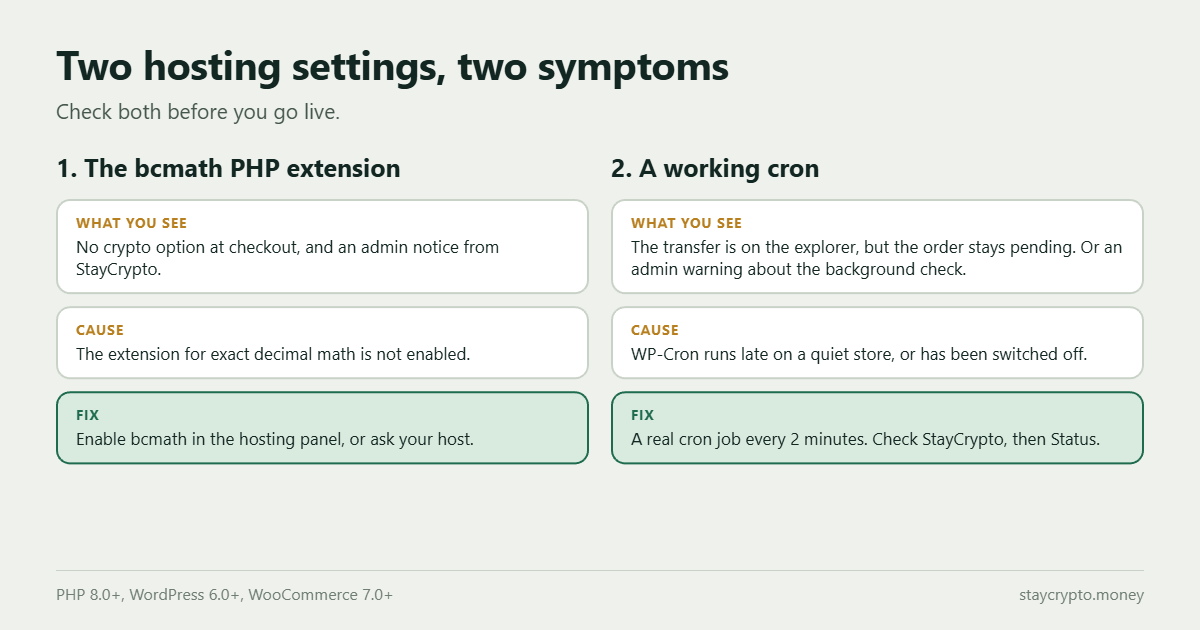
WooCommerce crypto payments can fail to show up at checkout, or be picked up late, for two plain hosting reasons. The PHP extension bcmath is missing, or the background job that re-checks orders, WP-Cron, is not running on time. Neither is a bug in your store. Both take a few minutes to fix, and StayCrypto tells you in the admin when it spots either one. Here is how to check them and what to set.
Why a crypto plugin cares about your hosting
StayCrypto runs inside your own store, not on a server of ours. It reads the blockchain from your site, matches each incoming transfer to an order by its exact amount, and closes the order. That design has two consequences. The matching needs exact decimal math, which is where bcmath comes in. And the reading has to keep happening even when nobody is looking at the payment page, which is where cron comes in.
For the full list of requirements (PHP 8.0, WordPress 6.0, WooCommerce 7.0), see the documentation. The two below are the ones that cause most of the confusion.
bcmath: the math extension
An invoice for 40.27 USDT has to be compared to the incoming transfer exactly, to the last digit. Ordinary decimal numbers in PHP are stored as floating point, and floating point cannot always represent a value like 0.1 exactly. A payment that differs from its invoice by a rounding crumb would never match its order. The bcmath extension does decimal math with arbitrary precision, so the plugin uses it for every amount.
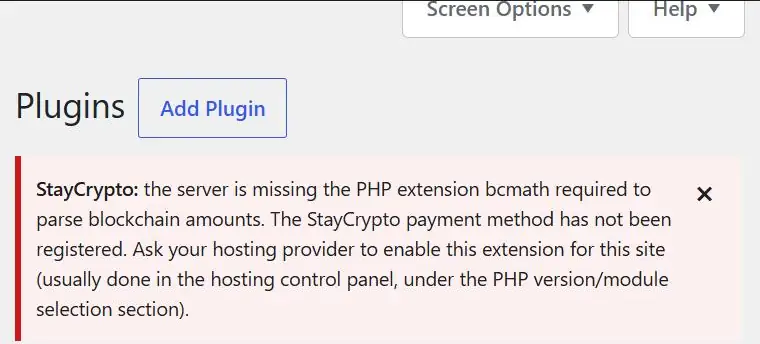
If bcmath is missing, StayCrypto does not guess. It does not offer crypto at checkout, and it shows an admin notice saying bcmath is missing. Your customers simply see no crypto option, which is easy to mistake for a settings problem.
How to check and fix it
- Activate the plugin. If bcmath is missing, the WordPress admin shows the notice right away.
- Or open your hosting panel and look for bcmath in the list of PHP extensions. Panels often call that page PHP Selector, Select PHP Version or PHP settings.
- Or ask your host: “Please enable the PHP bcmath extension for my domain.” Your host can switch it on.
After it is enabled, reload the admin. The notice should be gone and StayCrypto should appear in the payment methods at checkout.
Cron: the background check
Two checks, not one
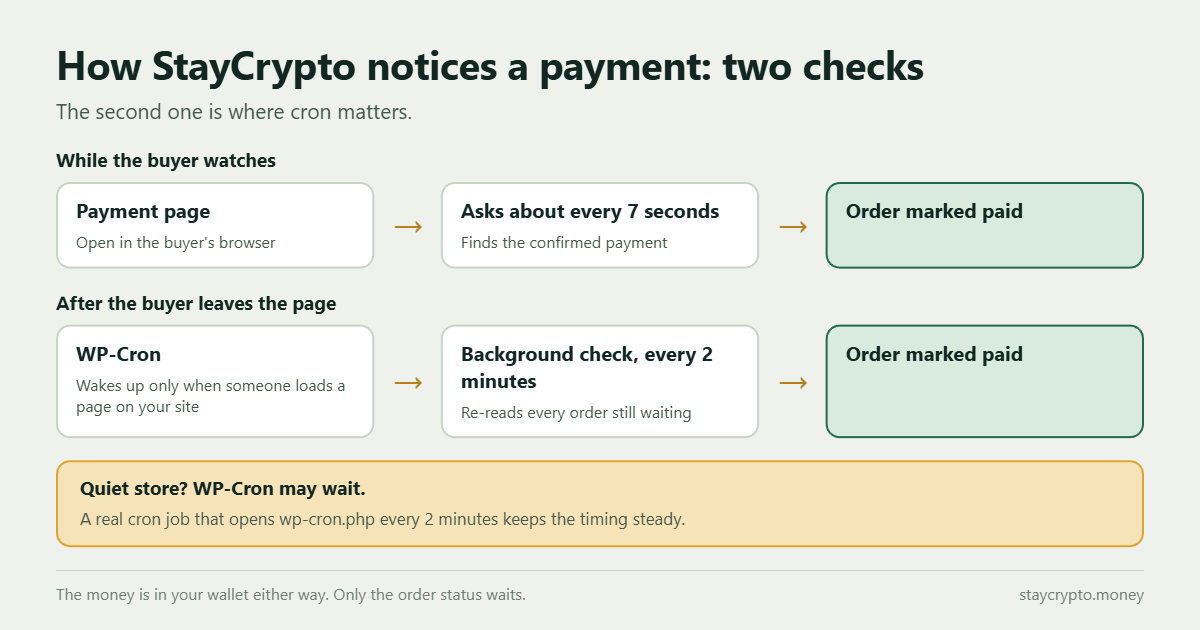
While a buyer keeps the payment page open, that page asks for the payment about every seven seconds. That is why a confirmed payment feels instant to the buyer. But buyers close tabs. Then a second check takes over: a background job that runs every 2 minutes and re-reads every order still waiting for payment. It is the safety net for everyone who paid and left the page.
Why WP-Cron can run late
WordPress has no real background process. Its scheduler, WP-Cron, only wakes up when someone loads a page on your site. On a busy store that means it runs close to on time. On a quiet store nobody may visit for an hour, and the 2 minute check waits. In that time the money is already in your wallet; only the order is not marked paid yet.
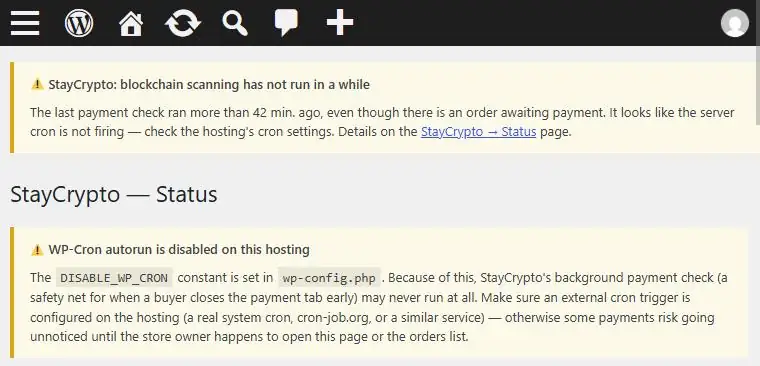
Some hosts and speed plugins also switch the built-in trigger off with DISABLE_WP_CRON in wp-config.php. If nothing replaces it, the background check stops completely.
What it looks like
| What you see | Likely cause | What to do |
|---|---|---|
| The crypto option is missing at checkout | bcmath is not enabled | Enable the bcmath extension (see above) |
| The transfer is on the block explorer with enough confirmations, but the order stays pending for many minutes | The background check is late | Open StayCrypto → Status, then set up a real cron job |
| An admin warning says the background check is behind | The schedule is not running | Set up a real cron job |
StayCrypto watches for this itself. If the background check is overdue by about 15 minutes or more (30 minutes until the plugin has learned your normal rhythm) and an order is waiting, it shows a warning in the admin and sends a Telegram message if you have set that up. If the 2 minute schedule disappears completely, for example after a cleanup plugin runs, the plugin puts it back on the next request and tells you it did. For the longer list of causes, see why a USDT payment does not show up in WooCommerce.
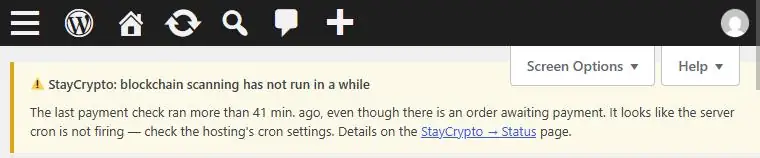
Set up a real cron job
- Open Cron Jobs in your hosting panel. DirectAdmin, cPanel and most other panels have a page with that name.
- Add a job that runs every 2 minutes. In the schedule fields use
*/2for the minute and*for the rest, with this command:
curl -s "https://your-site.com/wp-cron.php?doing_wp_cron" > /dev/null 2>&1- Replace
your-site.comwith your own domain. If curl is not available on your host, usewget -q -O - "https://your-site.com/wp-cron.php?doing_wp_cron"instead. - No access to cron on your plan? A free external service that opens the same address on a timer does the same job. cron-job.org is one example.
- Open StayCrypto → Status in your WordPress admin. It shows whether the background check is running on time.
You do not need to edit wp-config.php for this. If you want the built-in trigger off once the real cron job is confirmed to be working, you can add define( 'DISABLE_WP_CRON', true ); there. Do that only after the real job runs, because with the trigger off and no real job, nothing runs the background check.
A short checklist
- bcmath is enabled, and the crypto option shows at checkout.
- A real cron job opens
wp-cron.phpevery 2 minutes. - StayCrypto → Status shows the background check running on time.
- Telegram notifications are set up, so a late check reaches you without opening the admin.
FAQ
Does StayCrypto work without a real cron job?
Payments are still detected: the payment page checks while a buyer is watching, and WP-Cron runs the background check when visitors arrive. The real cron job matters for buyers who close the page and for quiet stores, where the background check can be late. Nothing is lost during the delay. The money is in your wallet, and the order waits to be marked paid.
What is bcmath?
A PHP extension for exact decimal math. StayCrypto needs it to compare payment amounts to the last digit. Without it, the plugin does not offer crypto at checkout and shows an admin notice.
How often does the background check run?
Every 2 minutes, when WP-Cron fires on schedule. With a real cron job it fires on schedule regardless of site traffic.
How do I know the background check is running?
Open StayCrypto → Status in your WordPress admin. If the check falls behind while an order is waiting, the plugin also shows a warning in the admin, and sends a Telegram message if notifications are set up.
Do I need a real cron job on a busy store?
A busy store triggers WP-Cron often, so it usually runs close to on time. A real cron job costs nothing and removes the guesswork, so it is still worth setting up.