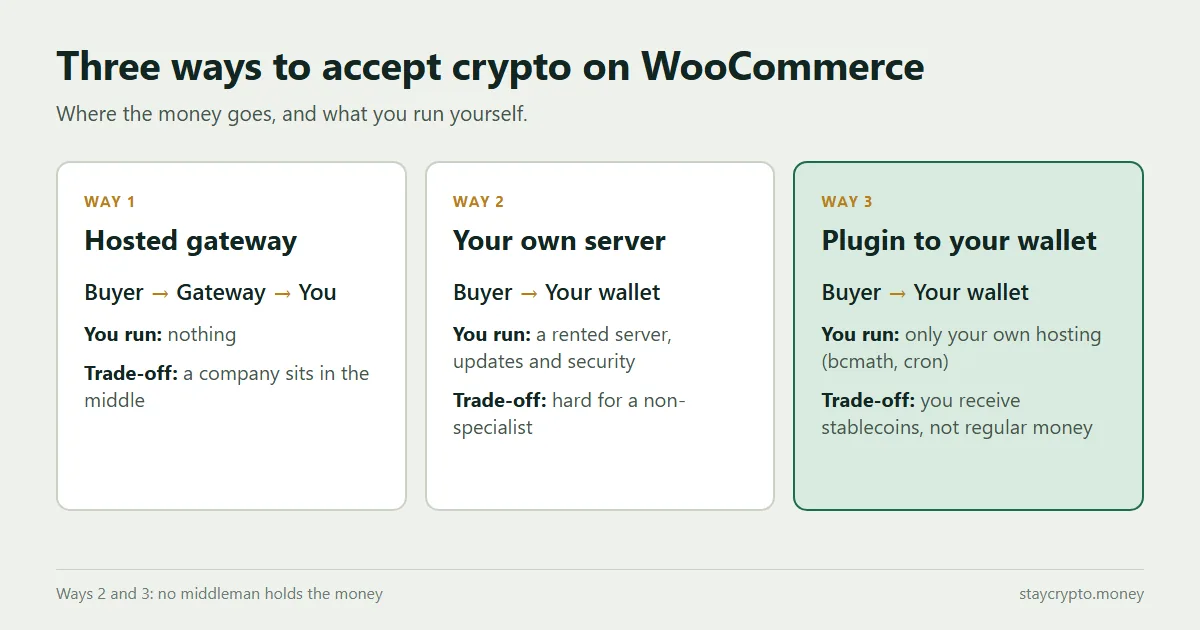
There are three realistic ways to accept crypto payments on WooCommerce: a hosted gateway that handles the payment for you, a payment server that you run yourself, or a plugin that sends the money straight to your own wallet. They differ in who touches the money, how much setup you take on, and who you can ask for help. Below is how each one works, what it asks of you, and which store it suits.
The facts about the two self-run tools come from their own official pages, checked in October 2026. The parts about setup effort come from our own experience.
The short answer
- You want the least setup and are fine with a company in the middle: a hosted gateway.
- You want full control and have someone who can run a server: your own payment server.
- You want no middleman and no server, and you accept stablecoins in a wallet: a plugin that pays straight to your wallet.
Way 1: A hosted gateway
A hosted gateway is a company that sits between your buyer and you. The buyer pays on the company’s system, and the company passes the money on to you, often after converting it to regular money if you ask. You install their plugin, connect your account, and the rest happens on their side.
What you get. Quick setup, a dashboard with your transaction history, and a support team you can write to. Many of them can convert to regular money, which matters if you do not want to hold crypto.
What you give up. The money passes through their system before it reaches you, so you depend on the company staying open, keeping to its terms, and not freezing or delaying a payout. Most need an account, and some ask you to verify your business. Fees vary and are not always one number, see the hidden spread and other costs to check. For the difference in who holds the funds, read custodial vs non-custodial gateways.
Way 2: Your own payment server
Here you run the payment software yourself, on a server you rent. Two well-known open source examples are BTCPay Server and SHKeeper. Both describe themselves on their official sites as self-hosted and open source, and both say the private keys stay with you. Both have a WooCommerce plugin. The BTCPay Server site states that it charges 0% fees, and the SHKeeper site lists its open source version as free. For a closer look at BTCPay Server, read BTCPay WooCommerce: server setup vs a plugin without one.
What you get. Full control, no middleman, and no per-payment fee from the software. SHKeeper lists USDT on Tron and several other networks, among many coins.
What it asks of you. A server. The BTCPay Server deployment page lists one-click hosting from about 10 to 30 dollars a month and a regular VPS at about 10 to 70 dollars a month, and says a manual installation is not recommended for production. The SHKeeper site lists server sizes that depend on the coins you accept, and its own pages give different numbers in different places, so check the current figures before you plan. Whichever you pick, you also keep the server updated, backed up and secure.
Our experience. For someone who is not a specialist, setting up a payment server was hard, and it needed a rented server plus ongoing care for its work and its safety. Support for BTCPay Server comes from its documentation, GitHub and community chat; its site does not mention official paid support, and it describes itself as an open source project rather than a company. SHKeeper offers a paid plan that includes a year of support, priced at 2,000 dollars a year on its site.
Way 3: A plugin that pays straight to your wallet
This is the lightest version of the self-run idea. The plugin lives inside your own WooCommerce store, shows the buyer your wallet address and an exact amount, and watches the blockchain for the transfer. No third party holds the money and there is no server to rent. The money lands in your wallet, and the order is marked paid once the network confirms it.
StayCrypto works this way. It is free, takes USDT and USDC on Tron, BNB Chain, Polygon and Ethereum, and has no registration. Details are in the plugin guide and what changes without a third party. Other plugins of this kind are compared in WooCommerce crypto payment plugins: 7 compared.
What it asks of you. It runs on your hosting, so the server must have the PHP bcmath extension and a background cron that fires on time. Both are quick to check, see the bcmath and cron guide. You also receive stablecoins, not regular money, so turning them into euros or dollars is your own step through an exchange, and the plugin does not offer card or bank payments.
Side by side
| Hosted gateway | Your own payment server | Plugin to your wallet | |
|---|---|---|---|
| Who holds the money on the way | The gateway, for a moment | Nobody, it goes to your wallet | Nobody, it goes to your wallet |
| Account or verification | Usually yes | No | No |
| Server to rent and maintain | No | Yes | No, runs on your hosting |
| Setup effort | Low | High for a non-specialist | Low |
| Converts to regular money | Often yes | No | No |
| Support | Usually a support team | Community, or a paid plan | Developer, free plugin |
| Fees | Set by the gateway, check the full list | Software free, server costs money | No fee from the plugin, only network fees |
Which one fits your store
- You sell to many countries and want regular money in the bank: a hosted gateway is the simpler fit.
- You have a developer or admin and want everything under your control: your own payment server.
- You run a small or medium store, want no middleman and are happy to hold stablecoins: a plugin to your wallet.
There is no best answer for every store. Each way trades one thing for another, and it is fine to start with one and move to another later.
Can I accept Bitcoin too?
Yes, but not with every option. The BTCPay Server documentation says Bitcoin is the only focus of the project, so it is the natural choice if Bitcoin is your main coin. Among plugins that pay straight to your wallet, ZeroBeep lists Bitcoin in its free version, and CryptoPay offers it through paid network add-ons. StayCrypto takes USDT and USDC only, with no Bitcoin. We compare these in WooCommerce crypto payment plugins compared and BTCPay WooCommerce: server setup vs a plugin without one. The facts come from each maker’s own page, checked in October 2026.
What every method still needs from you
- A wallet that only you control. For larger amounts, see hardware wallets.
- A small test payment before real customers use it.
- A look at the network you accept. Fees differ a lot, see the cheapest network to accept USDT.
- A plan for refunds and disputes. Crypto payments cannot be pulled back by the buyer, see chargebacks on crypto.
- A basic picture of how stablecoin payments work, see stablecoin payments for online stores.
FAQ
Which way is the cheapest?
The software for the second and third way is free. The second way adds a rented server, which the BTCPay Server deployment page puts at roughly 10 to 70 dollars a month on a regular VPS, and your time. A hosted gateway has its own fee schedule, so read the whole price list, not only the headline rate.
Can I accept crypto without registering anywhere?
Yes, with a plugin that pays straight to your wallet, or with your own payment server. Hosted gateways usually need an account, and some ask you to verify your business.
Do I get euros or dollars in my bank account?
Only if the hosted gateway offers conversion to regular money, and many do. With your own server or with a plugin like StayCrypto you receive stablecoins in your wallet, and turning them into regular money is your own step through an exchange.
Do I need to be technical?
For a hosted gateway, no. For your own payment server, yes, or you pay someone who is. For StayCrypto you install it like any WooCommerce plugin, and the only technical parts are the PHP bcmath extension and a working cron, both covered in a short guide.
Can I switch later?
Yes. The payment method is a setting in WooCommerce. Switching does not move your old orders, so keep the records of what each method received.