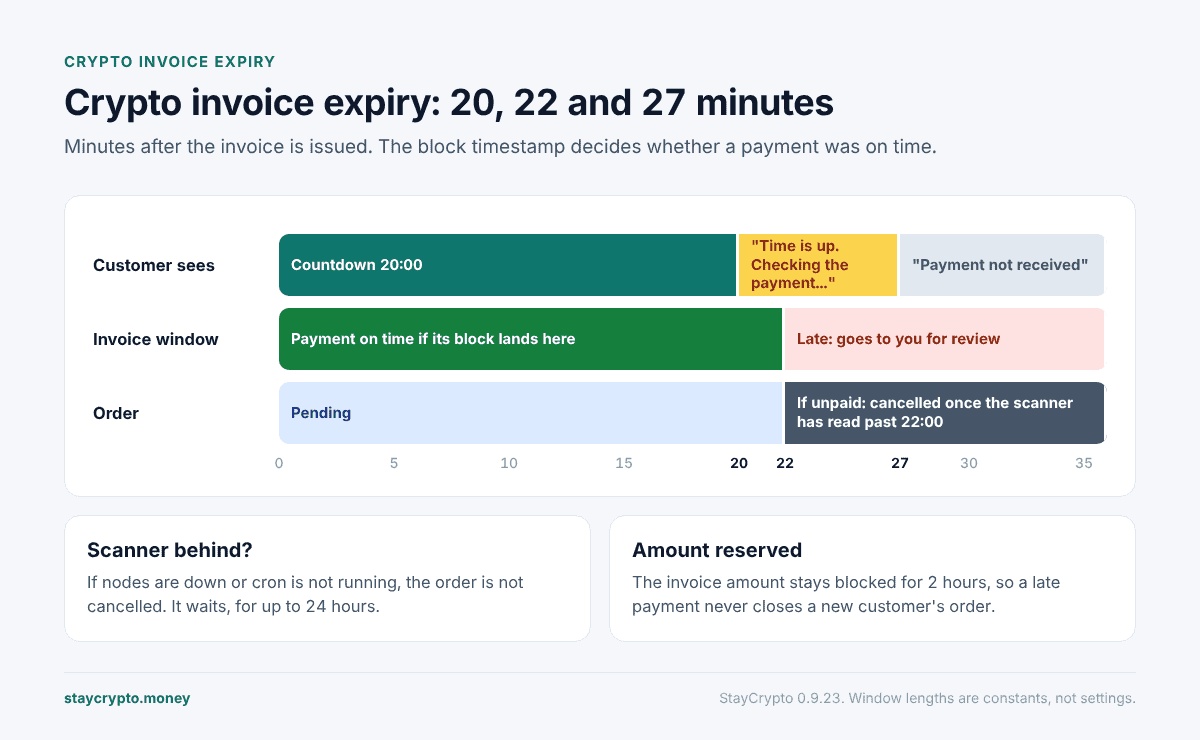
Long enough for a customer to open their wallet, find the right network and send the payment, and short enough that the exchange rate and the reserved amount do not go stale. For crypto invoice expiry, StayCrypto uses a 20-minute timer on screen and a 22-minute window in the background. A payment sent in the last two minutes, after the timer hits zero, still counts.
Table of Contents
There are actually six different clocks involved. Most confusion about crypto invoice expiry comes from mixing them up, so here they are one by one.
The 6 clocks behind crypto invoice expiry
| Clock | Length | What it does |
|---|---|---|
| Visible timer | 20 minutes | What the customer sees counting down |
| Invoice window | 22 minutes | A transfer whose block is timestamped within this window counts as on time |
| Safety margin | 5 minutes | Extra time after the window during which the order is not cancelled |
| Scanner wait | up to 24 hours | The order waits until the scanner has actually read the blocks up to the deadline |
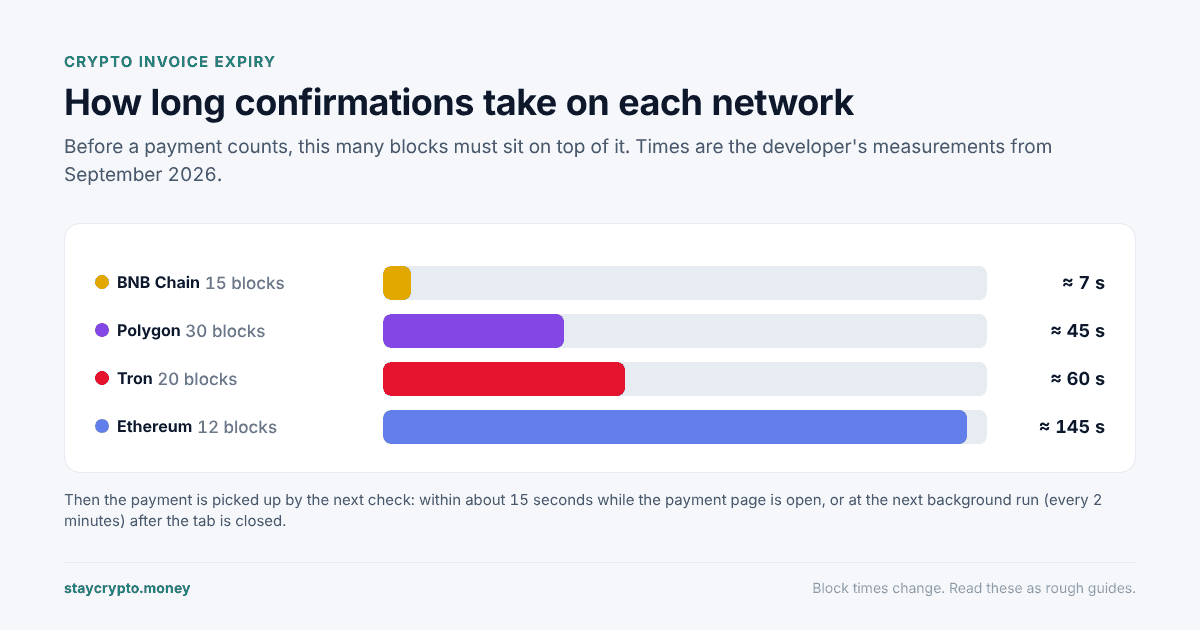
| Confirmations | 12 / 15 / 30 / 20 blocks | How many new blocks must sit on top of the payment before it counts (Ethereum / BNB Chain / Polygon / Tron) |
| Scan schedule | every 2 minutes | How often the background check runs; an open payment page nudges it at most every 15 seconds |
Why the customer sees 20 and the plugin uses 22
The two extra minutes are a cushion for the customer who presses “Send” just as the timer runs out. People round down. They see “0:40 left”, switch to the wallet app, paste the address, type the amount, confirm. That takes longer than 40 seconds.
What counts is the time of the block the transfer landed in, not when the plugin noticed it. If the block is inside the 22-minute window, the payment is on time, even if the plugin only reads it several minutes later.
What the customer sees after the timer ends
The timer runs on server time. Each status check returns the server clock, so a phone with the wrong time does not shorten or stretch it.
- At 20:00 the page switches to “Time is up. Checking the payment…” and keeps checking.
- If the payment is found, the customer is sent to the order confirmation page as usual.
- At 27:00, if nothing has been found, the page shows “Payment not received” and stops checking.
“Payment not received” on the screen does not mean the order is dead. It means the page has stopped waiting. The background check carries on.
When crypto invoice expiry actually cancels the order
This is where the code is more careful than most people expect. StayCrypto cancels an unpaid order only after the scanner has read the chain past the invoice deadline, so it knows for certain no payment arrived in time.
Because the scanner reads a few blocks behind the tip of the chain (it waits for confirmations), the cancellation lands slightly after the 22-minute mark: almost immediately on BNB Chain, and roughly two and a half minutes later on Ethereum. A transfer sent a second before the deadline gets its chance to be found.
If the scanner cannot read that far, because nodes are down or cron is not running, the order is not cancelled at 27 minutes. It waits, for up to a day. Better to leave an order open than to cancel one that was paid.
Worked examples
These use the developer’s own measurements from September 2026: 12 Ethereum blocks took about 145 seconds, 15 BNB Chain blocks about 7 seconds, 30 Polygon blocks about 45 seconds, 20 Tron blocks about 60 seconds. Block times change, so read them as rough guides.
| Situation | Paid at | Roughly when it clears |
|---|---|---|
| BNB Chain, page open | minute 5 | within 15 seconds to 2 minutes |
| BNB Chain, tab closed, cron every 2 min | minute 5 | at the next cron run, around minute 5 to 7 |
| Ethereum, page open | minute 21:30 | around minute 24 to 26; the page shows “Checking”, then redirects if found before 27:00 |
| Ethereum, tab closed, cron not working | minute 21:30 | only when something runs a scan; see setting up a real cron job |
| Any network | minute 22:30 | not automatically; the window has closed |
Payments that arrive after the window
A transfer that lands after the 22-minute window does not close the order automatically. Once the order is closed, it shows up on StayCrypto → Unassigned payments, usually with a note that a recently closed order asked for this amount. You decide what to do.
There is one edge case worth knowing. If the scanner is running behind and the order is still waiting, a late transfer with the exact amount may be matched before the order is closed. It depends on where the scanner is at that moment. It is rare, but it explains why a customer sometimes sees “Payment not received” and later gets an “order processing” email.
The amount of an unpaid order also stays reserved for two hours, so a late payment does not land on a new customer’s order by accident. More on that in why invoices have extra cents.
Should crypto invoice expiry be longer?
It is tempting to give customers an hour. The 22-minute window is a constant in the plugin, not a setting, and there are good reasons it is short:
- The reserved amount blocks that figure for other customers. Long windows mean more amounts tied up and bigger tails for everyone.
- For stores in other currencies, the exchange rate behind the invoice gets older.
- A long window makes late and duplicate payments harder to sort out.
Twenty minutes is plenty for anyone paying from a wallet. Customers paying from an exchange are the ones who run late, because withdrawals can sit in review. If many of your customers pay that way, say so in the checkout description: “Exchange withdrawals can be delayed. If yours is, contact us with the transaction link.”
What to tell a customer who paid late
We can see your transfer arrived after the payment window closed, so it was not matched automatically. Your money is in our wallet and nothing is lost. We will check it and come back to you about the order.
Do not promise a time, and do not ask them to pay again. A second payment just creates a second transfer to sort out.
If a customer says they paid but the order is still pending, see why a USDT payment does not show in WooCommerce.
FAQ
The timer ran out while I was sending. Is my payment lost?
No. Transfers in a block within 22 minutes of the invoice count as on time. Transfers after that go to the store owner for a decision. The money reaches the store’s wallet either way.
Why does the order still say pending after 30 minutes?
Most likely the scanner has not read the blocks past the deadline yet, often because background tasks are not running. Check the StayCrypto Status page.
Can I change the crypto invoice expiry time?
Not from the settings in the current version. It is a fixed constant, along with the 22-minute window.
Does a refresh restart the timer?
No. Refreshing shows the same invoice with the same amount and the same deadline.
What happens if the customer never chooses a network?
No invoice is issued, so there is nothing to time. The order stays pending and the scanner ignores it. How long such orders stay open follows your normal WooCommerce settings for unpaid orders (see the WooCommerce order statuses guide).