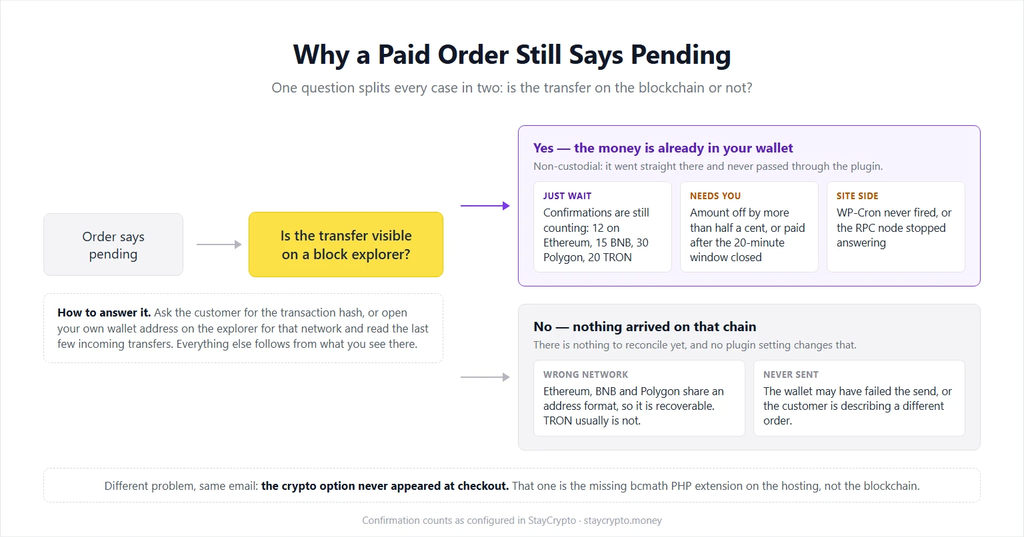
A customer says they paid. The order in WooCommerce still says pending. Before you refund anything or ship anything, one question splits every case of a USDT payment not showing in WooCommerce into two halves: did the money actually land on the blockchain, or not?
Open the transaction on a block explorer: Etherscan, BscScan, PolygonScan or Tronscan, depending on the network. If the customer can give you a transaction hash, that is the fastest route. If they cannot, open your own wallet address there and look at the last few incoming transfers. Money that is visible on the chain is money you have, whatever WooCommerce is showing you. Money that is not visible there was never sent, and no plugin setting will make it appear.
Everything below assumes a non-custodial setup, where payments go straight from the buyer’s wallet to yours and the plugin’s only job is to notice them. StayCrypto works this way, so the failure modes are different from a hosted processor. Nothing is stuck inside somebody else’s system. Either the transfer is on-chain or it is not.
In this guide:
- The money is on-chain but the order is pending
- The money is not on-chain at all
- Which situation needs waiting and which needs you
- Confirming a payment by hand
- FAQ: USDT payment not showing in WooCommerce
1. It arrived, and the plugin is still counting confirmations
The most common false alarm. A transfer shows up on the explorer within seconds, but a payment is only safe once enough blocks have been built on top of it. Until then a reorganisation of the chain could still undo it, which is exactly the hole a double-spend attempt aims for.
StayCrypto waits for a fixed number of confirmations per network before it marks the order paid:
| Network | Confirmations required |
|---|---|
| Ethereum | 12 |
| BNB Chain | 15 |
| Polygon | 30 |
| TRON | 20 |
Polygon’s 30 sounds like a lot until you remember its blocks come every couple of seconds. In wall-clock time the wait is short on BNB Chain, Polygon and TRON, and noticeably longer on Ethereum. If the explorer shows the transfer with fewer confirmations than the table above, the answer is to wait, not to touch anything.
2. The amount does not match to the cent
Here is the part that catches people. The plugin does not watch for “some USDT arriving”. It generates a unique amount for every order, down to the last cents, and that tail is how an incoming transfer gets tied to a specific order without giving every customer a separate address.
So if the buyer types a round number, or their wallet rounds the last decimal, or an exchange withdrawal shaves a fraction off, the transfer lands on-chain and matches nothing. The order stays unpaid. There is a tolerance of half a cent, because wallets and exchanges genuinely do send the last decimal place back slightly changed, but anything further off is not credited automatically, and that is deliberate. Crediting a near miss would be a way for every order in your store to be underpaid a little.
What happens instead: you get a notification, and the payment sits on the Unassigned payments page. From there it is your decision. The order screen shows the expected amount next to the received one, with buttons to confirm or reject.
3. The payment window had already closed
Each payment page holds a reserved amount for about twenty minutes of visible countdown, with a few extra minutes of grace behind it before that amount goes back into circulation for other orders. Reserving it forever is not an option, because the whole matching system depends on no two open orders sharing the same tail.
A buyer who opens the page, walks away and pays forty minutes later is paying against an invoice that no longer exists. The money is yours, the order is not marked, and it lands in Unassigned payments for you to confirm by hand.
4. Wrong network
Ethereum, BNB Chain and Polygon share the same address format, which is convenient right up until it isn’t. A buyer can copy your correct address and send on a chain you were not watching. The plugin scans the network the order was created for, so the transfer exists and nothing is looking at it. Recoverable: open that wallet on the chain the funds actually landed on and move them.
TRON is the harsher case. Its address format is different, so TRC-20 funds sent to an EVM address, or the reverse, may simply be gone. No gateway can undo that, custodial or not. Worth saying plainly at checkout which network the buyer is paying on.
5. WP-Cron never fired
The payment page checks the blockchain while the buyer is looking at it. The safety net for everything else is a background job that re-checks pending orders every two minutes, and it exists precisely because buyers close the tab early.
On WordPress that background job normally rides on visitor traffic. A store with few visitors can go an hour without anyone triggering it, and then payments look slow for a reason that has nothing to do with crypto. The fix is a real cron trigger on the server calling wp-cron.php on a schedule, which most hosting panels set up in a couple of minutes. StayCrypto also puts its own schedule back if something strips it out, and the Status page tells you whether the check is running on time or falling behind. Look there before assuming the scanner is broken.
6. The blockchain node stopped answering
To see a payment, the plugin has to read the chain through an RPC node, and public nodes go down, rate-limit, or answer with stale data. Each network has several endpoints with automatic failover, so one provider having a bad afternoon does not stop payments, and you can point the plugin at your own node if you would rather not depend on strangers.
The Status page shows the state of these endpoints. If a whole network is failing there, that is your answer, and the buyer did nothing wrong.
7. The payment method never appeared at checkout
A different problem with the same symptom in your inbox: the customer wanted to pay in crypto and could not. Usually the PHP extension bcmath is missing on the hosting. The plugin needs exact decimal arithmetic for amount matching and refuses to offer a payment method it cannot calculate correctly, so it shows an admin notice saying so. Your host can enable it, normally on request.
USDT payment not showing in WooCommerce: wait, or act
| What you see | What it means | What to do |
|---|---|---|
| On the explorer, confirmations below the threshold | Normal | Wait |
| Confirmed on the explorer, order pending, amount exact | Background check is late | Open the Status page |
| Amount off by more than half a cent | No automatic match, by design | Confirm or reject by hand |
| Paid long after the page expired | Invoice was released | Confirm by hand |
| Nothing on the explorer at all | Never sent, or sent on another chain | Check the other networks, then ask for a hash |
Confirming a payment by hand
- Find the transfer on the block explorer and check that the amount and the receiving address are yours.
- Open the order in WooCommerce and compare the expected amount with what arrived.
- Use the confirm button on the order screen if you are satisfied it is the same customer, or reject it and ask them to check out again.
- Keep the transaction hash with the order. It is your proof, and it is the first thing anyone will ask for later.
A shortfall of a few cents is rarely worth a second checkout. A larger gap is worth an email before you ship. In practice almost every one of these turns out to be a wallet rounding something, not anyone trying it on, and it takes about a minute to settle once you stop assuming the plugin broke.
FAQ
How long should I wait before treating a crypto payment as failed?
Past the confirmation count for that network plus a few minutes for the background check, a payment visible on-chain should be matched. If it isn’t, you have a matching problem, not a waiting problem.
The transaction is confirmed on the explorer but WooCommerce still shows pending. Where is my money?
In your wallet. Non-custodial means the transfer went straight there and never passed through the plugin. The order status is a record that has fallen out of step, not a place the money is being held.
Can I tell the plugin to accept any amount?
No, and that is on purpose. The unique amount is how a transfer gets matched to an order in the first place. Accepting anything close would quietly let orders be underpaid.
Does the plugin watch my wallet when no orders are open?
No. Scanning pauses when nothing is pending and resumes from the current block height with the next order. A transfer sent outside a normal checkout, a test of your own for example, will not be picked up. Check that one on the explorer directly.
What if the buyer paid twice?
Keep the order paid and send the second transfer back to the wallet it came from, in the same coin. There is no reversal to request, so a refund is a new transaction you send yourself.
Is there a support queue that can unstick a payment for me?
There is nobody in the middle to unstick it. That is the trade-off of a non-custodial gateway: no third party can block your money, and no third party can move it for you either.