A customer orders something for $40.00, picks USDT, and the USDT invoice on the payment page asks for 40.27. The extra 27 cents is not a fee, a tax or a network charge. It is a unique payment amount, and it is the only way a non-custodial gateway can tell one order from another. The cents stay with the store.
Table of Contents
That answer usually raises two more questions: why does it work that way, and how much does it cost the customer on average? Both have concrete answers, because the logic is written into the plugin and nothing about it is random in a hidden way.
The plugin does not know who paid
With a custodial gateway, every customer gets a deposit address of their own, or the gateway sees the money arrive in its own account and ties it to an order on its side. A non-custodial plugin has neither option. Every order on a network pays to the same address: yours. StayCrypto never holds your keys and never generates addresses for you, so when 40.27 USDT lands in your wallet, the transfer itself carries no order number. The blockchain records a sender, a receiver, a token and an amount.
The sender address is no help either. Customers pay from exchanges, from shared wallets, from a friend’s phone. So the plugin identifies the order by the one thing it controls: the amount. If two orders waiting on the same network asked for the same amount, a single transfer could match either of them. The extra cents exist to stop that.
If you want the longer version of why this model exists at all, the custodial vs non-custodial comparison covers the trade-offs.
How the extra amount on a USDT invoice is picked
In StayCrypto the steps are fixed:
- The order total is converted to USD (one USDT or USDC is treated as one dollar) and rounded up to the next cent.
- The plugin builds 61 candidates: that base amount plus 0.00, 0.01, 0.02 and so on up to 0.60.
- It removes every candidate that is already taken by another open invoice on the same network, plus amounts that are being held back for late payers (more on that below).
- From what is left, it draws three random positions and keeps the smallest one.
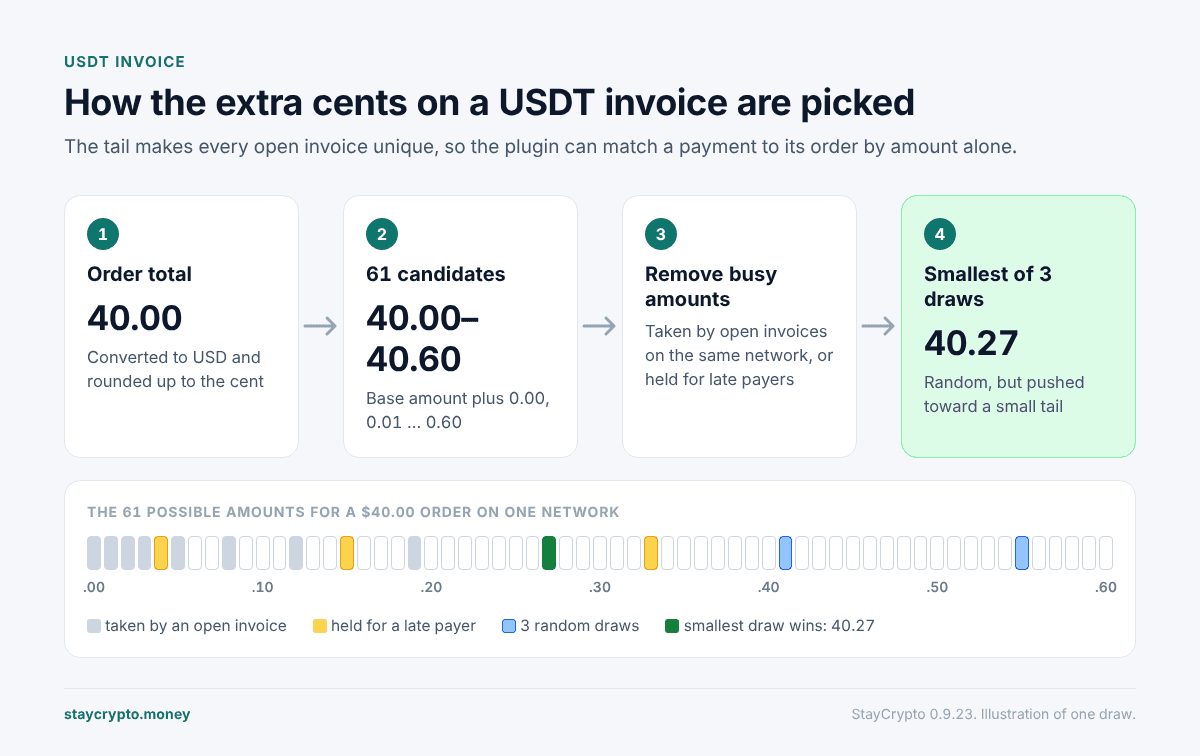
Step 4 is the part people ask about. Why not always take the smallest free amount? Because then two back-to-back orders at the same price would get the same tail, and a late payment for the first order could land on the second. Some randomness has to stay. Taking the smallest of three draws keeps it while pushing the typical tail down.
What the USDT invoice tail costs on average
With an empty queue, the expected tail works out to about 15.75 cents, so roughly $0.16. The maximum is $0.60. Here is the spread when nothing else is waiting on that network:
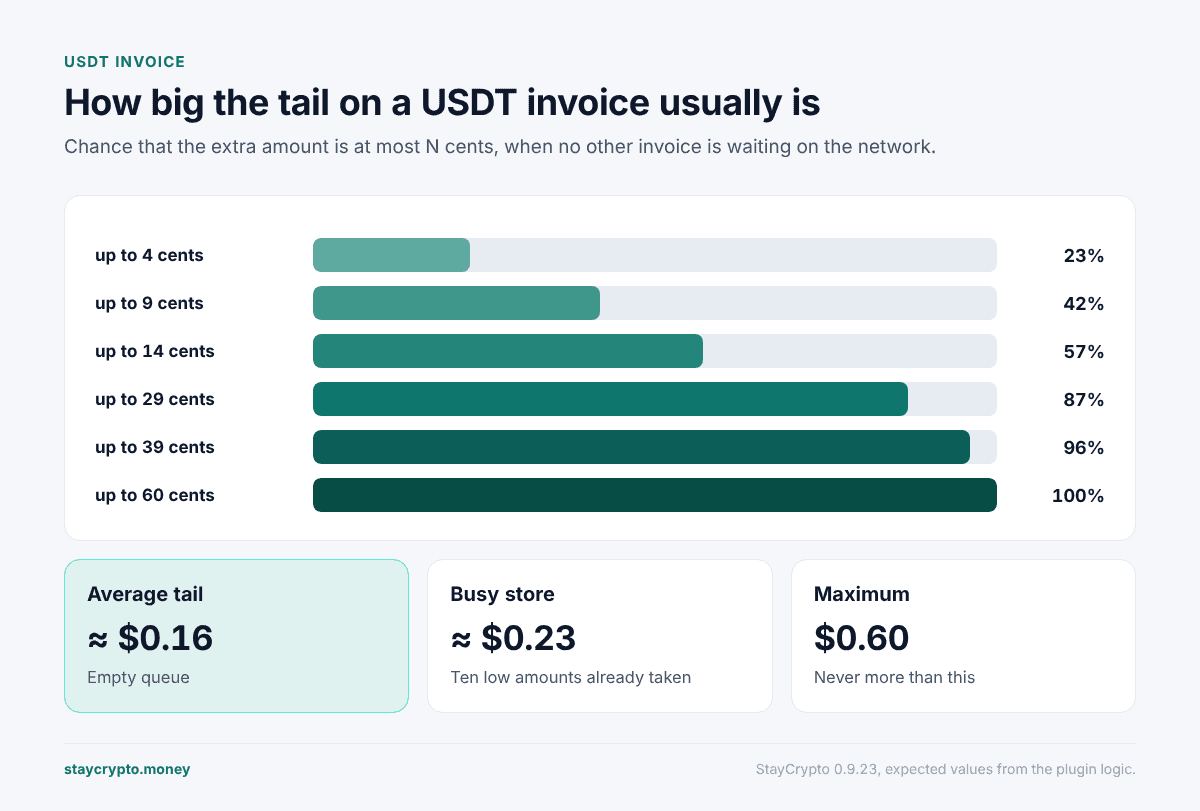
| Tail is at most | Chance |
|---|---|
| 4 cents | about 23% |
| 9 cents | about 42% |
| 14 cents | about 57% |
| 29 cents | about 87% |
| 39 cents | about 96% |
| 60 cents | 100% |
On a busy store the low amounts fill up first, so tails drift higher. With ten low positions already taken, the average climbs to around 23 cents.
On a $200 USDT invoice nobody notices. On a $1 order, a 60 cent tail would be 60% of the price, which is exactly why the method is hidden for orders under $1. During testing on a demo store, an item priced at about 3 cents turned into a 0.29 USDT invoice. That is not something you want a customer to see, so the minimum stays.
Two customers checking out at the same second
Picking an amount happens under a short lock, about 10 seconds, so two people at checkout cannot both be handed 40.27. The exchange rate is fetched before the lock is taken, so a slow rate source cannot hold everyone else up.
If every one of the 61 amounts is taken by live invoices, the buyer sees “Too many active payments right now. Try again in a minute.” and you get a Telegram alert that a buyer could not get an invoice. If the only free amounts are ones being held for late payers, the plugin reuses one of those rather than refusing the sale, logs a warning, and tells you once an hour per network.
Why some amounts are held for two hours
Suppose a customer gets an invoice, gets distracted, and pays an hour later after the order has been cancelled. If that same amount had already been handed to a new customer, the late transfer would quietly pay the wrong order.
To make that unlikely, the amount of an unpaid order stays reserved for two hours after its invoice was issued. A late payment during that window arrives at an amount nobody else is using, and it goes to you for a decision instead of closing a stranger’s order. There is also a separate safety check for payments that match both an open order and one that closed recently: those are not credited to either and go to manual review. Past these windows there is no protection, and the plugin does not pretend otherwise.
How to pay a USDT invoice correctly
Send exactly the amount on the USDT invoice, down to the last digit. The payment page says so: “Send the exact amount down to the last digit.”
Matching is strict. A transfer that is short by more than a millionth of a token is no longer an exact match, and the order will not close on its own. Overpaying by less than a cent still counts as exact. Anything further off goes to you for review, which is covered in why a USDT payment does not show up in WooCommerce.
The QR code on the page contains the address only, not the amount, so the buyer types the amount in their wallet, down to the cent. Typing it by hand is safer than trusting every wallet to read an extended payment-link format (EIP-681 on Ethereum-style networks) correctly.
How to explain it to a customer who asks
Something short works best:
The few extra cents make your payment unique, so our system can match it to your order automatically. Please send the exact amount shown.
Do not call it a fee, because it is not one, and do not ask the customer to round the number. A rounded amount will not match.
FAQ
Is the extra amount on a USDT invoice a fee?
No. It is part of the payment and arrives in your wallet with the rest. The plugin takes nothing.
Can I turn the tail off?
No. Without a unique amount, a non-custodial plugin cannot tell two orders apart. Removing it would mean payments landing on the wrong orders.
Why did one customer get 3 cents and another 48?
The tail is drawn from the free amounts at that moment. On a quiet store it is usually small. When other invoices are open on the same network, the low amounts are taken and tails get bigger.
What if a customer sends 40.30 instead of 40.27?
It will not close the order automatically. If it is within 5% of the invoice and there is only one open order on that network, it is flagged on that order for you to confirm or reject. If another order happens to be waiting for exactly 40.30, it would match that order, which is one more reason to ask for the exact figure.
Does the USDT invoice tail depend on the network?
The rules are the same on Ethereum, BNB Chain, Polygon and Tron. Amounts are reserved per network, so the same 40.27 can be open on Polygon and on Tron at once without conflict.