A customer sends you a screenshot: “Withdrawal 3.12 USDT, completed.” Your wallet shows 2.62 USDT received. The order is still pending: the USDT underpaid case every store meets sooner or later. Nobody lied. The exchange most likely took its withdrawal fee out of the amount instead of charging it on top, and the transfer that reached you no longer matches the invoice.
Table of Contents
This is the most common reason a payment arrives USDT underpaid, and it is rarely the customer being careless. Here is what is going on and how to handle it without losing the sale or the customer’s goodwill.
A wallet and an exchange send money differently
From a personal wallet (Trust Wallet, MetaMask, a hardware wallet), the customer types 3.12, and 3.12 arrives. The network fee is paid separately in the network’s own coin: ETH, BNB, POL or TRX.
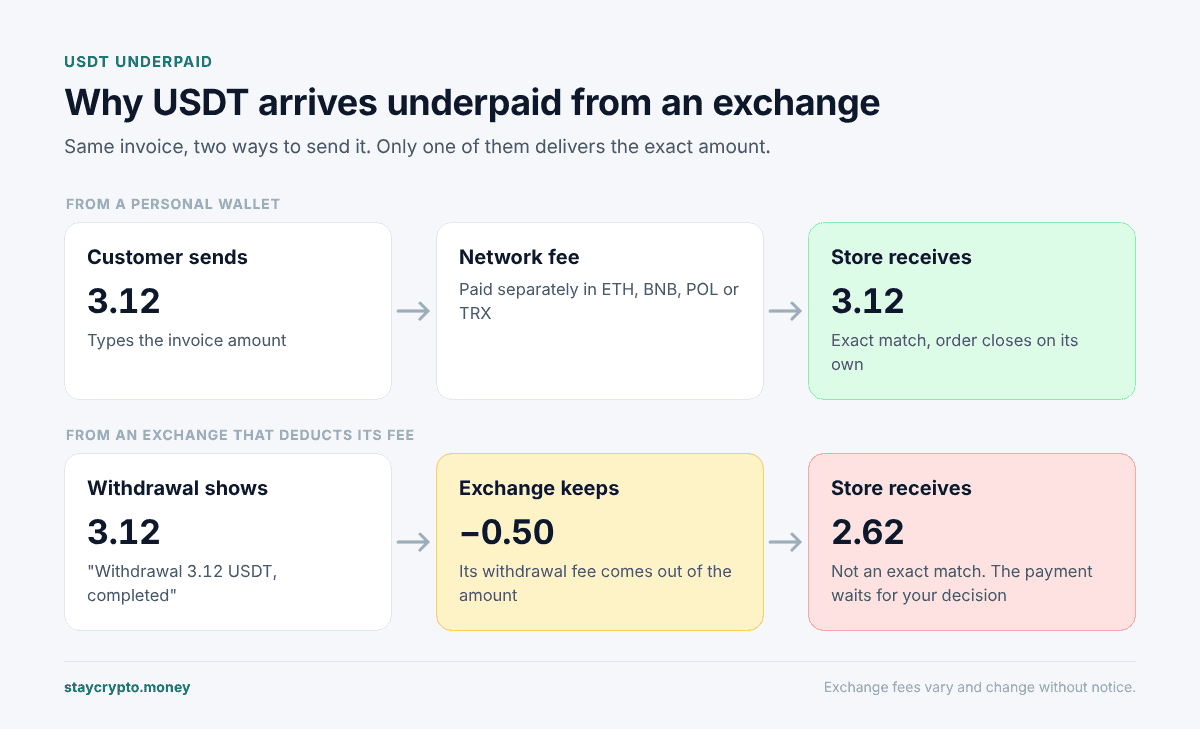
An exchange account works differently, and each exchange sets its own rules. Things that regularly cause trouble:
| What the exchange does | What you see |
|---|---|
| Takes the withdrawal fee out of the amount | Less than the invoice arrives, so the payment is flagged as underpaid |
| Has a minimum withdrawal | Nothing arrives at all; the withdrawal was refused |
| Lists one “USDT” with several networks | If the customer picks a network you do not accept, the transfer never reaches the plugin |
| Bundles several withdrawals into one transaction | Each transfer to you is still counted separately |
| Holds the withdrawal for review | The money arrives minutes or hours later, possibly after the invoice expired |
We cannot tell you what a specific exchange does today, because they change fees and screens without notice. Check with the exchange in question.
Why USDT underpaid by a few cents means “not paid”
A non-custodial plugin finds the order by its amount. Every invoice gets a unique figure, such as 3.12 instead of 3.00, so that payments can be told apart (why invoices have extra cents). That only works if the match is strict.
StayCrypto treats a transfer as an exact match when it equals the invoice to the cent. The only slack is one millionth of a token, for wallets that cut off the last digit (10.419999 instead of 10.42). A transfer that is short by 2 cents is not an exact match, and the order will not close on its own.
What happens next depends on how far off it is:
| Customer sent (invoice 3.12) | Result |
|---|---|
| 3.12 | Exact. Order closes automatically |
| 3.129 | Exact. Overpaying by less than a cent still counts |
| 3.10 | Short by 0.6%. Flagged on the order as an unmatched payment |
| 2.97 | Short by 4.8%. Flagged as unmatched |
| 2.96 | Short by 5.1%. Flagged as too far from the invoice |
| 2.62 | Short by 16%. Flagged as too far from the invoice |
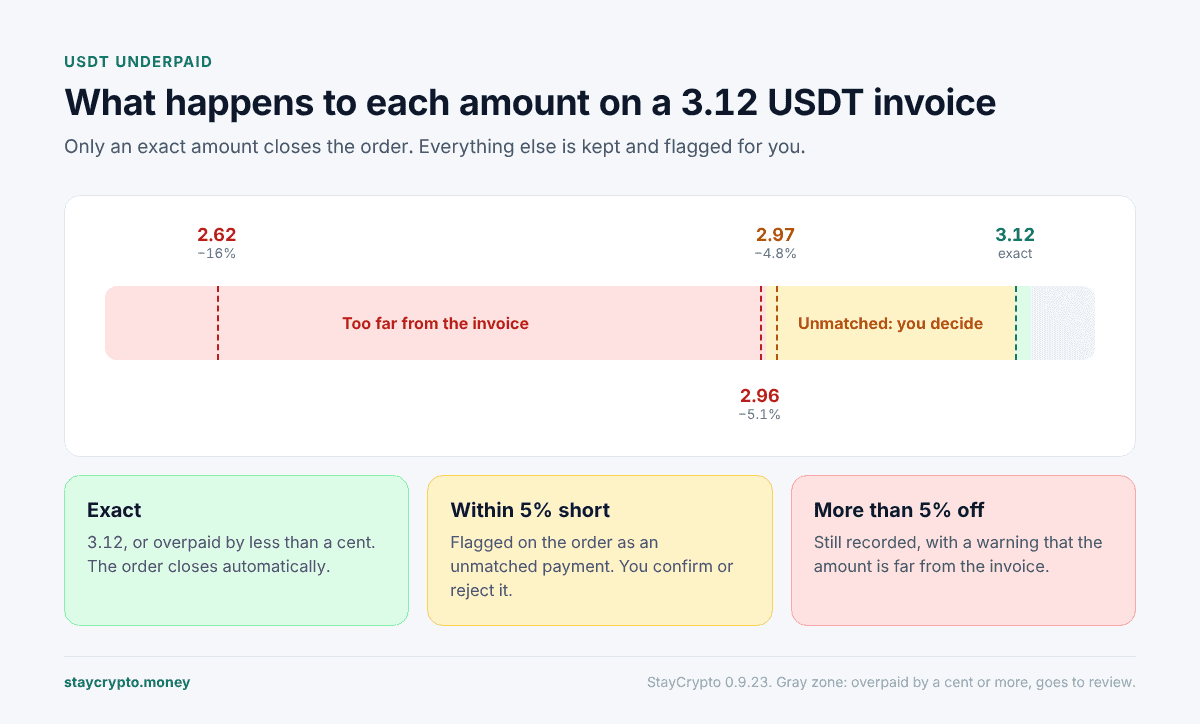
The 5% line is not a discount. It is the window in which the plugin says “this probably belongs to that order, please decide.” Outside it, the plugin still records the payment, but warns you that the amount is far off.
Where a USDT underpaid payment shows up
Nothing is lost. A USDT underpaid transfer lands in one of two places in your admin:
- On the order itself, in a box labelled “StayCrypto: unmatched payment”, if there was exactly one open order on that network and coin when the money arrived.
- On the StayCrypto → Unassigned payments page, if the plugin could not pick an order (none open, several open, or a closed order that recently asked for that amount).
You also get a Telegram message if you have it set up, and the customer gets an email, though not earlier than 20 minutes after their invoice was issued. On the payment page the customer sees “Amount did not match” with the expected and received figures side by side.
3 easy ways to fix a USDT underpaid order
There is no correct answer here, only your store policy. The usual choices:
Accept it as paid. For a shortfall of a few cents or one exchange fee, many stores simply ship. Open the order, check the transaction in the explorer, and click “Confirm as paid”. The plugin completes the order and leaves a note saying it was confirmed manually by the store owner. WooCommerce sends its usual order email, but nothing explains the shortfall, so send the customer a short note yourself.
Ask for the difference. Tell the customer exactly how much is missing. Be aware that a second, separate top-up transfer will not join up with the first one. The plugin does not add partial payments together. Each transfer is judged on its own, so the top-up will show up as its own unassigned payment and you will confirm the order by hand once both have arrived.
Return it. If the order no longer makes sense, send the money back yourself, from your wallet, as an ordinary transfer. No plugin button does this, because a non-custodial plugin never has access to your funds. The refunds guide walks through manual returns.
“Reject” on the order is not a refund either. It only says “this payment does not belong to this order” and moves it to the Unassigned list. The money stays in your wallet.
Before you click Confirm as paid
Open the transaction in the explorer for the right network (Etherscan, BscScan, PolygonScan or Tronscan) and check five things: the transaction succeeded, the token contract is the real USDT or USDC, the recipient is your address, the amount is what the plugin says, and the time fits the order. Then make sure the same transfer has not already paid another order. The plugin also refuses to confirm a transfer that already paid a different order.
How to prevent most of this
You cannot control exchange fee rules, but the payment page already says “Send the exact amount down to the last digit.” A line in your checkout description helps:
Paying from an exchange? Some exchanges deduct their fee from the amount you withdraw. Make sure the amount received is exactly the invoice amount.
When customers ask how, the honest answer is: set the withdrawal so that the amount after fees equals the invoice, or pay from a personal wallet.
If a payment shows no trace at all, read why a USDT payment does not show in WooCommerce. To send money back, see refunding a crypto payment in WooCommerce.
FAQ
Is it the customer’s fault?
Usually not. Exchanges show fees in different ways and many people do not know the fee is taken from the amount.
Will a USDT underpaid order close if the customer sends the missing cents?
No. The top-up is a separate transfer and the plugin does not add transfers together. You will confirm the order manually after the second payment arrives.
The exchange combined two withdrawals into one transaction. Is that a problem?
Usually not. The plugin tracks each transfer by its position inside the transaction, so two transfers in one transaction are two payments. If both carry the same amount and one already paid an order, the second goes to manual review rather than being credited twice.
The customer paid two hours late from an exchange. What now?
The invoice has expired and the order is probably cancelled. The payment shows up on Unassigned payments, usually with a note that a recently closed order asked for that amount. You decide what to do with it.
Can I widen the 5% window so short payments close automatically?
No. Automatic matching stays exact on purpose: a loose match is how one transfer ends up closing the wrong order.