Email is fine for “you have a new order”. It is not fine for “a customer paid 4% short and is waiting for you”, or “nothing has checked the blockchain for 40 minutes”. StayCrypto can send those as Telegram notifications through a bot you create yourself, in about five minutes. It is optional, and once a payment needs a human decision it is the fastest way to find out.
Table of Contents
What you need
- A Telegram account.
- Administrator access to the store. Shop managers can see whether a bot is saved and press “Send test”, but only an administrator can set the bot token or the chat.
You do not share anything with StayCrypto. The plugin talks to Telegram’s servers directly from your site. Telegram receives order numbers, amounts and links to your admin. Nobody else does.
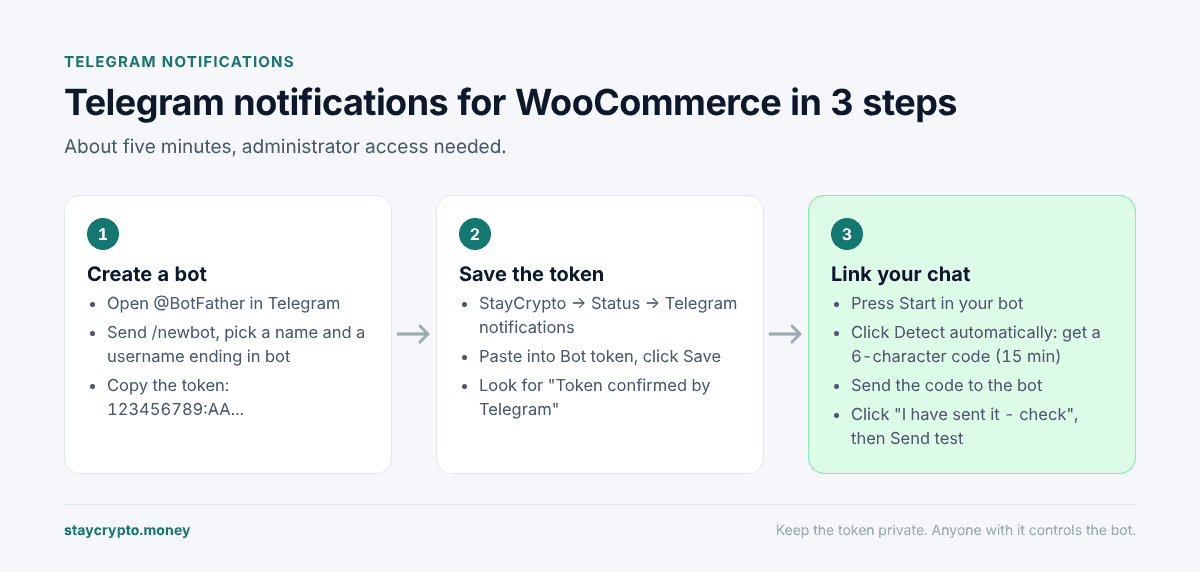
Step 1: create a bot
- In Telegram, open a chat with @BotFather (see Telegram’s BotFather guide).
- Send
/newbot, choose a display name, then a username ending inbot. - BotFather replies with a token that looks like
123456789:AA....
That token is the key to your bot. Anyone who has it controls the bot, so do not paste it into chats, support tickets or screenshots.
Step 2: save the token
Go to StayCrypto → Status → Telegram notifications, paste the token into “Bot token” and click Save. The plugin checks it with Telegram right away:
- “Token confirmed by Telegram – bot @yourbot” means it worked.
- “Telegram rejected the token” means it was mistyped or revoked. Copy it again from BotFather.
After saving, the token is hidden behind dots, and it is masked in the logs.
Step 3: link your chat
This part has a step that the on-screen hint does not fully describe, so follow it exactly:
- Open your new bot in Telegram and press Start.
- Back on the Status page, click Detect automatically. The first click shows a one-time code of six characters, valid for 15 minutes.
- Send that code to your bot as an ordinary message.
- Click I have sent it – check. The plugin reads the bot’s recent messages, finds your code and saves the chat it came from: “Chat found: … – saved”.
- Click Send test. You should get a test message in Telegram within seconds.
Why the code? An earlier approach simply took the chat of whoever last wrote to the bot. That meant a stranger who found your bot could end up receiving your store alerts. Matching a one-time code ties the alerts to the chat you control.
A personal chat is the simplest choice. Groups work too, but bots in groups may not see ordinary messages by default, which can make the code step fail.
What each of the Telegram notifications means
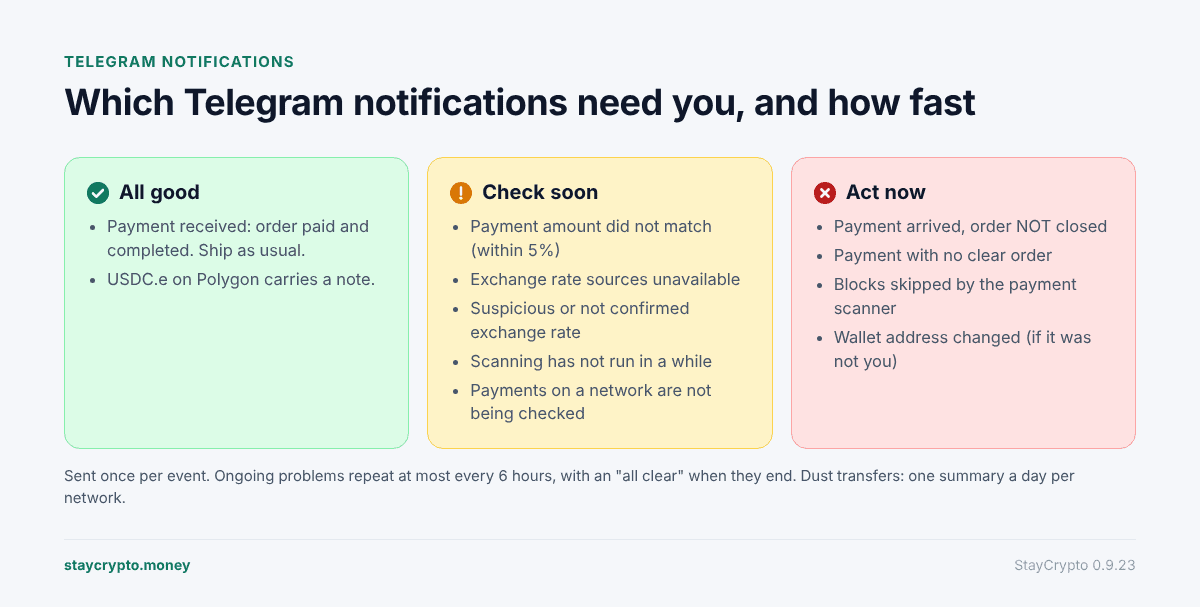
| Message | When it arrives | What to do |
|---|---|---|
| ✅ Payment received | An order was paid and completed | Nothing. Ship as usual. Polygon payments in bridged USDC.e carry a note saying so |
| ⚠️ Payment amount did not match | A payment within 5% of the invoice arrived on an order | Open the order and confirm or reject it |
| ❗ Payment arrived, order NOT closed | Right amount and coin, but the order could not be completed (another plugin failed, the order was edited after the invoice, or a different coin was used) | Check the WooCommerce log, fix the cause, then confirm by hand |
| ❗ Payment with no clear order | A payment landed that the plugin could not tie to a single order | Look at StayCrypto → Unassigned payments |
| ❗ Blocks skipped by the payment scanner | A block range failed ten times and was skipped | Check the payments listed on Unassigned and look into the node or hosting problem |
| ⚠️ Exchange rate sources unavailable | Neither rate source answers | Check whether your fallback rate is set and sensible |
| ⚠️ Suspicious / not confirmed exchange rate | A new rate was rejected by the safety checks | Compare with a public source; set a fallback if the move is real |
| ⚠️ Blockchain scanning has not run in a while | Background checks stopped while an order was waiting | Check your cron setup |
| ⚠️ Payments on a network are not being checked | The scanner has not moved for 15 minutes with an order waiting | Check the nodes on the Status page |
| Every payment amount is taken / a buyer could not get an invoice | Too many open invoices on one network at once | Usually passes on its own; investigate if it repeats |
| Wallet address changed | Someone changed a receiving address | If it was not you, act immediately |
Telegram notifications are sent once per event, not every two minutes. Ongoing problems such as the rate outage repeat at most every 6 hours, and you get an “all clear” when the problem goes away. Dust transfers are summarised at most once a day per network.
One limit of Telegram notifications
The “scanning has not run in a while” alert is sent from inside a scan. If background tasks have stopped completely, there is no scan to send it, and Telegram stays quiet. The warning will still show in your admin, but only when someone opens it. That is the main reason to set up a real cron job rather than count on alerts.
Troubleshooting
“Detect automatically” finds nothing. Usually the code was not sent to the bot, or more than 15 minutes passed. Click again for a new code. Also check that the bot has no webhook set by another service: Telegram does not hand out messages to a bot with a webhook, so the check cannot see your code. Telegram also keeps unread bot messages for only 24 hours.
“Bad Request: chat not found”. The chat ID is wrong or the bot never received a message from that chat. Repeat step 3.
“Forbidden: bot was blocked by the user”. You blocked the bot at some point. Unblock it and press Start.
“Unauthorized”. The token is wrong or was revoked. Create a new token in BotFather and save it again.
“Too Many Requests”. Telegram limits how fast bots can post, roughly one message a second to a chat (Telegram bot FAQ). The plugin waits and retries automatically.
If the token ever leaks, revoke it in BotFather, issue a new one and save it on the Status page. The old one stops working at once.
Telegram alerts also help when a payment needs a decision. For what to do with one, see why a USDT payment does not show in WooCommerce.
FAQ
Are Telegram notifications required?
No. The plugin works without it. Emails still go out, and every issue is visible in the admin. Telegram just gets the news to you faster.
Can several people receive the alerts?
Yes. Add the bot to a group and link the group in step 3. Keep in mind the note about bots in groups.
Does the customer get Telegram notifications?
No. Telegram alerts go only to the store’s chat. Customers get emails.
Will I get a message for every order?
Only for crypto payments handled by StayCrypto, and for problems. Card or bank transfer orders are not affected.
Can I use one bot for two stores?
You can, but name things clearly so you know which store each message comes from. A separate bot per store is cleaner.