BTCPay WooCommerce setup means running your own BTCPay Server and connecting your store to it with a plugin. It is free and open source, and it suits stores that want Bitcoin and are ready to look after a server. A plugin without a server, like StayCrypto, is simpler when you mainly want to receive stablecoins and have no server to maintain. This page shows what each one asks of you. Every fact about BTCPay comes from its own website and documentation, checked on 25 October 2026.
A note on bias: StayCrypto is our own plugin, and we say below where it falls short. BTCPay is not a competitor in the usual sense. It is a different way to solve the same problem, and for some stores it is the better one.
The short answer
- Choose BTCPay if you want Bitcoin, you are comfortable running a server (or paying someone to run one), and you want a full payment system with invoices and a wallet.
- Choose a plugin without a server if you mostly want USDT or USDC, you want to install a plugin and enter a wallet address, and you do not want to maintain anything beyond your store.
- Many stores could use either. The difference is how much work you take on.
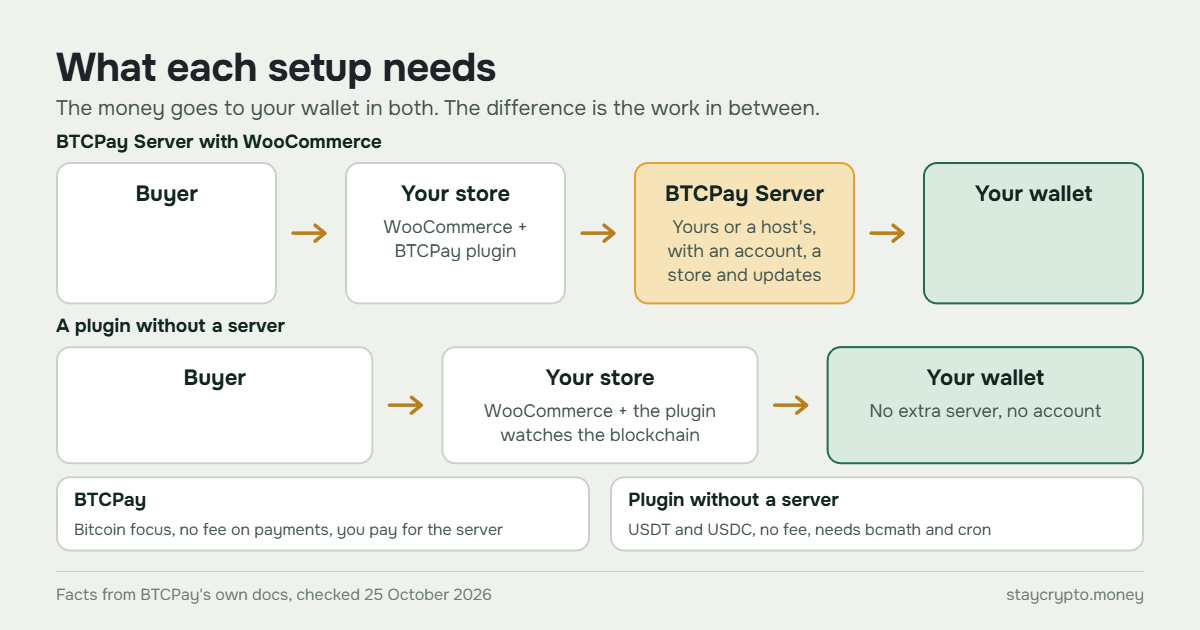
What BTCPay Server is
BTCPay Server calls itself a self-hosted, open-source cryptocurrency payment processor that is “secure, private, censorship-resistant, and free”. Its home page promises “0% Fees & No Third-party” and says funds arrive directly in the wallet you connect. The documentation adds that your private keys are never uploaded to the server. You can run it in a cloud, on your own hardware, or on an existing host, and a shared server is offered to people who are not technical. WooCommerce is one of the integrations it lists.
“Free” here means no fee on payments. The server itself still has to run somewhere, and that has a cost, as the next sections show.
BTCPay WooCommerce setup: what you need
BTCPay’s WooCommerce plugin is called BTCPay for WooCommerce V2. According to its documentation, you need:
- A WooCommerce store on PHP 8.0 or newer, with the cURL, gd, intl, json and mbstring extensions.
- A BTCPay Server version 1.3.0 or later, either one you host yourself or one hosted by a third party.
- An account on that BTCPay instance, a store inside it, and a wallet connected to that store.
Setup goes in four steps. You install and activate the plugin, connect it to your BTCPay Server (an API key wizard is recommended), enable the BTCPay payment gateway in WooCommerce under Settings, Payments, and run a test purchase. The wizard also creates the webhook that tells your store a payment arrived. The documentation warns that hosting, firewalls or security plugins can block webhook requests and return a 403 error, so that is the first thing to check if orders do not update.
By default the buyer is sent to a BTCPay invoice page. An option shows the invoice on your checkout page instead, so the buyer does not leave. An order counts as settled after a number of confirmations that you can configure.
Where you can run the server and what it costs
BTCPay’s deployment page compares several ways to run the server:
- One-click hosts: LunaNode at about $10 a month, Clovyr at about $20 and Comet Cash at about $30, all rated “Easy”.
- A virtual private server from a provider such as DigitalOcean, Google Cloud or Azure: $10 to $70 a month, rated “Moderate to Hard”.
- Third-party hosts, free or paid depending on the provider, where someone else runs the instance for you.
- Manual or hardware builds, which the page says are not recommended for production.
The deployment FAQ lists 2 GB of RAM and 80 GB of storage with pruning enabled, and Docker. If you add more coins, you need more storage for each coin’s blockchain. Prices on that page are the host’s own and change, so check them before you decide.
None of this is a reason to avoid BTCPay. It is the work you take on. If you pick a third-party host, you hand part of it to someone else, and then your store depends on that host.
Which coins BTCPay takes
BTCPay’s altcoin FAQ says Bitcoin is the only focus of the project and its core developers. Other coins are opt-in integrations that, in its words, “are maintained by their respective communities and are listed here only for convenience”. The same page warns that an integration that is not actively maintained will be removed.
Stablecoins are possible through a separate plugin. The plugin directory lists a Tether USDt plugin (version 0.7.6.0, published on 27 September 2026) for TRON, Ethereum and Polygon. It is published by a different GitHub organization from BTCPay’s own, and the page does not label it official or community. The WooCommerce documentation does not mention stablecoins. So if you want USDT or USDC, check that plugin and its requirements before you rely on it. USDC and BNB Chain are not mentioned in what we found.
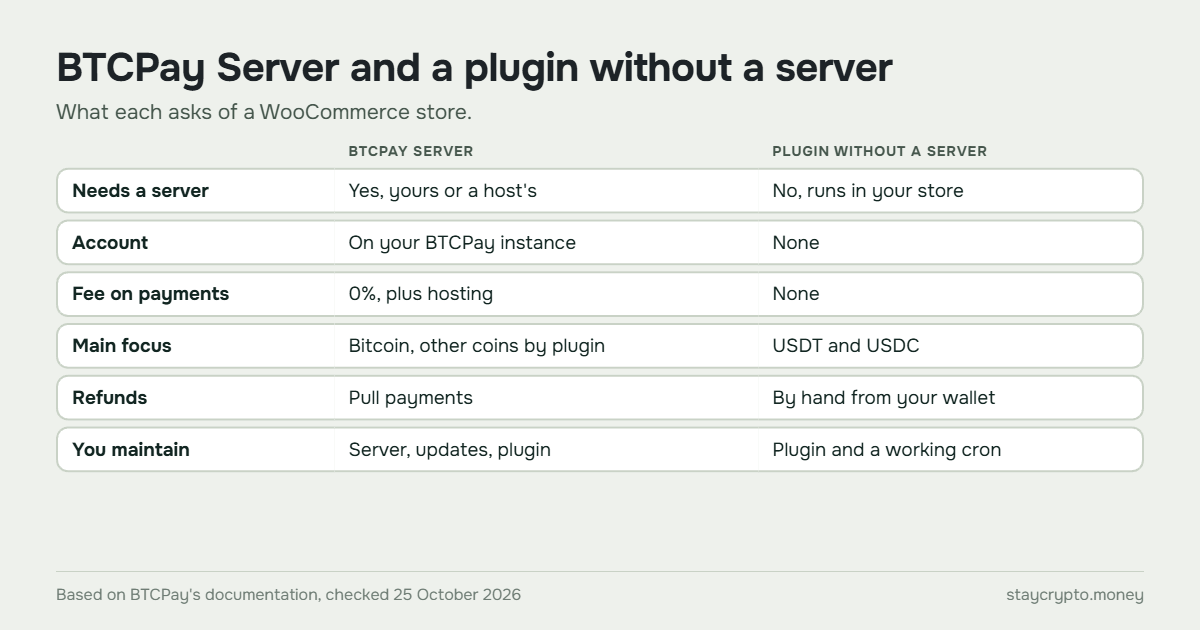
Side by side: BTCPay Server and a plugin without a server
| BTCPay Server with WooCommerce | StayCrypto (a plugin without a server) | |
|---|---|---|
| Needs a server | Yes, your own or a third party’s | No, runs inside your store |
| Account with the maker | An account on your BTCPay instance | None |
| Fee on payments | 0%, plus hosting for the server | None, no extra server |
| Main focus | Bitcoin, other coins by plugin | USDT and USDC (Tron: USDT only) |
| Networks for stablecoins | TRON, Ethereum, Polygon via the Tether USDt plugin | BNB Chain, Polygon, Ethereum, Tron |
| Buyer experience | Invoice page, or a window on your checkout | Address, exact amount and QR code on your checkout |
| Refunds | Through pull payments, with a permission on the API key | By hand from your wallet |
| What you maintain | The server, its updates and the plugin | The plugin and a working cron on your hosting |
| In the WordPress.org directory | Yes, as BTCPay for WooCommerce V2 | Not yet |
What BTCPay does well
It charges no fees on payments, it is open source, and it holds nothing for you: the keys stay with you. It comes with more than checkout, including point-of-sale, payment links and invoicing, according to its home page. If your main coin is Bitcoin, it is the more complete choice, because the project is built around it.
What a plugin without a server does differently
StayCrypto has no server to rent and no account to open. You enter a wallet address, buyers pay the exact amount shown, and the plugin finds the transfer on the blockchain and completes the order. It takes USDT and USDC on BNB Chain, Polygon and Ethereum, and USDT on Tron. Only a site administrator can change the address, and a payment that matches no order waits for your decision instead of being guessed.
It also has limits. It is stablecoins only, with no Bitcoin or Lightning. It needs the PHP extension bcmath and a working cron on your hosting, and it matches payments by amount, so unrelated transfers to the same address make your records harder to read. It is not in the WordPress.org directory yet, and it has no public reviews. You can see the plugin on its plugin page.
Which one fits your store
Pick BTCPay if Bitcoin is your main coin, you have someone who will keep a server running, and you want the full toolbox. Pick a plugin without a server if you mostly receive USDT or USDC, your hosting is the only hosting you want to look after, and you prefer to enter an address and start.
If you are still choosing between a hosted gateway, your own server and a plugin, start with three ways to accept crypto payments on WooCommerce. To see more plugins side by side, read WooCommerce crypto payment plugins compared. For why direct payment differs from holding by a provider, see custodial vs non-custodial gateways.
What both still need from you
Neither setup protects your wallet for you. Keep the key offline and the address under your control, as we explain in crypto wallet security for an online store. A crypto payment cannot be reversed, so even where a refund goes through a pull payment, it is a new transfer you approve. Our guide to refunding a crypto payment in WooCommerce shows the manual way. Whichever you choose, send yourself a small test payment before real orders.
FAQ
Is BTCPay Server really free?
BTCPay says it is free and charges 0% fees. You still pay for wherever the server runs, which BTCPay’s own page puts at about $10 to $70 a month depending on the option.
Do I need my own server to use BTCPay with WooCommerce?
You need a BTCPay Server instance, but not necessarily your own. The documentation says it can be self-hosted or hosted by a third party.
Can BTCPay accept USDT?
It can through a separate Tether USDt plugin for TRON, Ethereum and Polygon, according to the plugin directory. BTCPay’s own FAQ says that altcoin integrations are maintained by their communities. Check the plugin’s page before you decide.
Is a plugin without a server less safe?
That is not the right comparison. In both cases the money goes to your wallet and the keys stay with you. The risks differ: with a server you must keep the server updated, and with a plugin without a server you must keep your WordPress site and the wallet address under your control.