Sending USDT on the wrong network does not always mean the money is gone. If the receiving address is a wallet whose owner controls the private key, the funds are usually sitting there on the other network and can be moved. The bad cases are transfers to an exchange that does not support that network, or to an address nobody controls. Which USDT wrong network case you are in decides everything.
Table of Contents
This guide is for both sides: the customer who sent the payment, and the store owner who is asked “where is my money?”
Why USDT wrong network mistakes happen
USDT is issued on several blockchains: Ethereum (ERC-20), BNB Chain (BEP-20), Tron (TRC-20), Polygon and others. Each is a separate token on a separate ledger. Sending “USDT” from an exchange usually means choosing one of these networks from a list. Pick a different one from the one the receiver expects, and the money arrives on a ledger the receiver may not be watching.
Two facts matter for recovery:
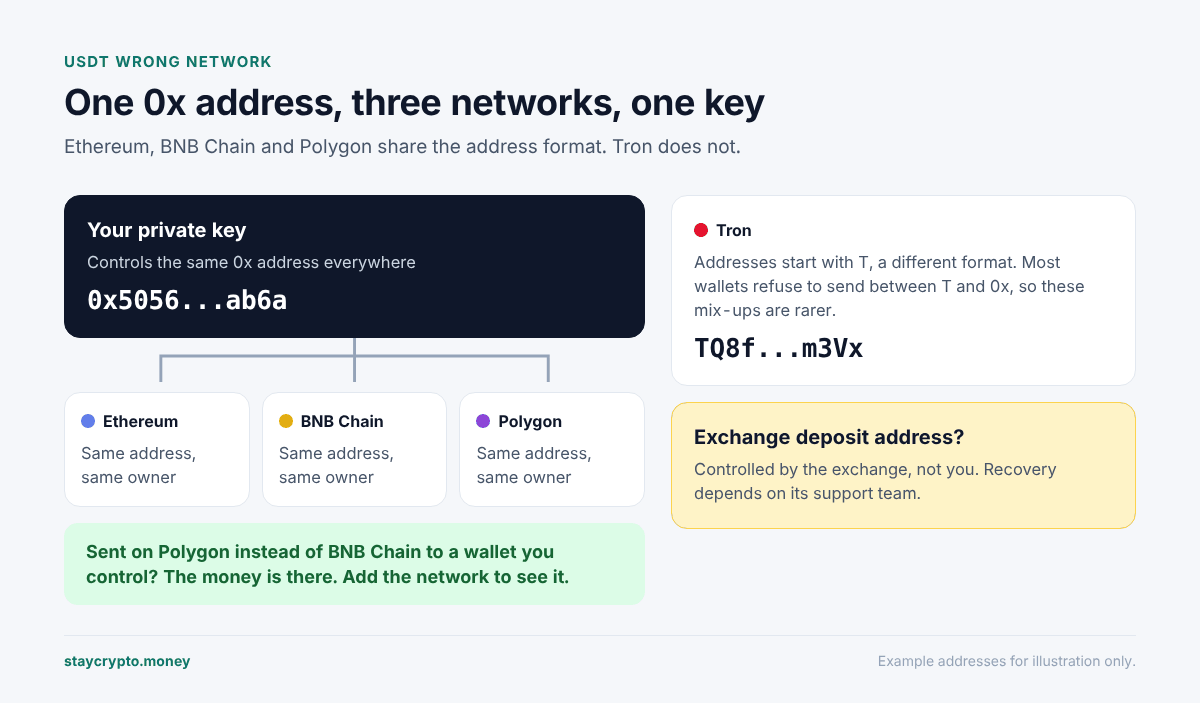
- Ethereum, BNB Chain and Polygon use the same address format. An address starting with
0xis valid on all three, and whoever holds the key for it on one holds it on all of them (how Ethereum-style accounts work). - Tron uses a different format. Tron addresses start with
T. Most wallets and exchanges refuse to send a TRC-20 transfer to a0xaddress, or the reverse, so cross-format mistakes are rarer.
Case 1: wrong EVM network, receiver uses their own wallet (fixable)
Example: the store asked for USDT on BNB Chain, the customer sent USDT on Polygon to the same 0x address.
The money is there. The store owner controls that address on Polygon too. They only need to:
- Add the Polygon network to their wallet (most wallets support it by default).
- Look at the USDT balance on Polygon.
- Keep a little POL for the network fee if they want to move it.
Nothing is lost. The order will not be marked paid automatically, though, because the store was not watching that network for this invoice. The owner checks the transfer and confirms the order by hand.
Case 2: wrong network to an exchange deposit address (sometimes fixable)
Example: someone withdrew USDT on BNB Chain to an exchange deposit address that only accepts USDT on Ethereum.
The address is controlled by the exchange, not by you. Whether you get the money back depends on the exchange. Some have a recovery process for “deposits on an unsupported network”, often with a fee and a waiting period. Others do not. Contact support with:
- the transaction hash (TxID),
- the network you used,
- the amount, token and time,
- your account details.
Do this quickly, and only through the exchange’s official support page. Recovery “services” that find you on social media are almost always scams.
Case 3: right network, wrong token (fixable)
Example: the invoice asked for USDT on Polygon, the customer sent USDC on Polygon.
The money is in the right wallet on the right network; it is just a different token. The receiver sees it as a separate balance. For a store, this is a business decision: accept it as payment (it is worth the same in dollars) or return it. The order will usually not close by itself, because the amount was expected in a different token.
Case 4: wrong amount on the right network (fixable)
Not strictly a network mistake, but it lands in the same support inbox. If the transfer went to the right address on the right network but the amount is off, the money is there. On stores that identify orders by exact amount, the payment just needs a human decision. Exchanges that subtract their fee from the withdrawal cause most of these; see USDT underpaid from an exchange.
The case you usually can’t fix
Money sent to an address nobody controls is usually gone for good. That includes:
- a token’s own contract address pasted by mistake,
- a typo that happened to form a valid address,
- an address generated by a service on a network it does not support and cannot access.
Blockchain transfers are final. No bank, plugin or exchange can reverse them. That is why it pays to check the network before every send.
What to do in the first hour
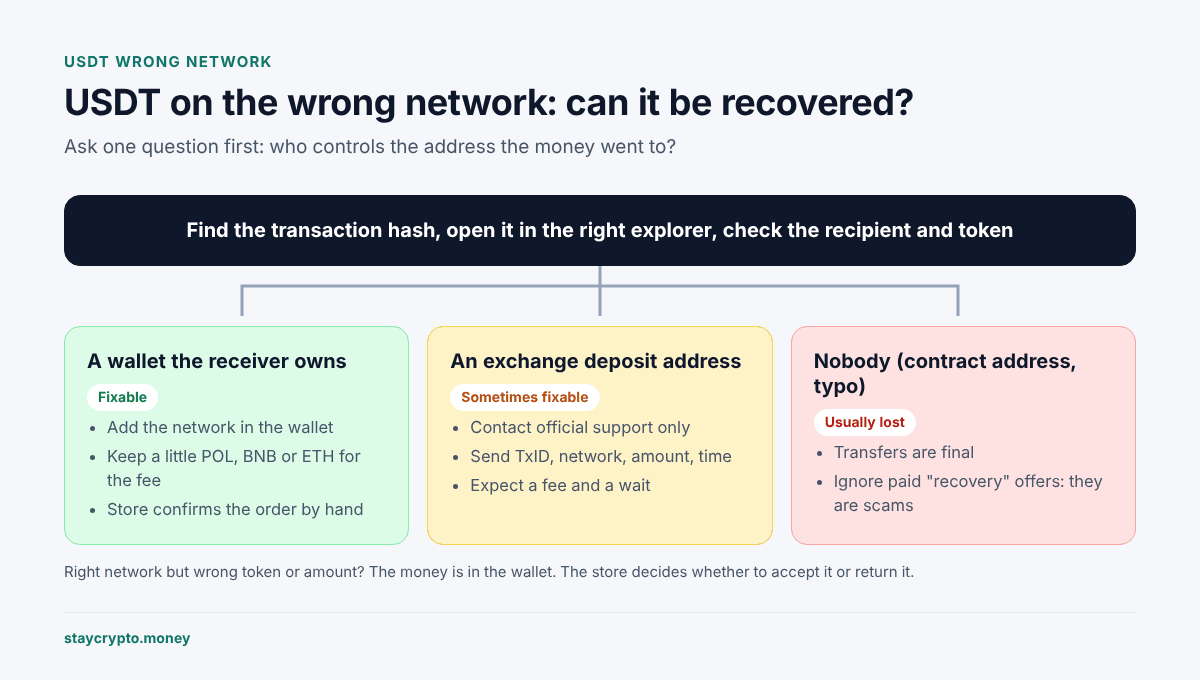
- Find the transaction. Open your wallet or exchange history and copy the transaction hash.
- Open it in the right explorer. Etherscan for Ethereum, BscScan for BNB Chain, PolygonScan for Polygon, Tronscan for Tron. If it does not show up in the explorer you expected, try the others.
- Check the recipient and token. Confirm the “to” address of the token transfer and the token contract.
- Decide who controls the address. A personal wallet: the owner can see the funds by adding the network. An exchange: contact its support. Unknown: assume it is lost and do not pay anyone to “recover” it.
- Tell the other side. If you were paying a store, send them the transaction link. If you run the store, reply quickly so the customer does not panic or pay twice.
For store owners: how to prevent most of this
- Name the network everywhere. “USDT (Tron, TRC-20)”, not just “USDT”, on the payment page and in emails.
- Offer the networks your customers use. Most exchanges send USDT cheaply on Tron and BNB Chain; see our network comparison.
- Use one EVM address for all EVM networks in your own wallet, so a Polygon payment sent instead of BNB Chain still reaches you.
- Know your refund process for payments you cannot use. Our refund guide covers wrong-network cases.
With a plugin that pays straight to your wallet, such as StayCrypto, a payment on a network the invoice did not ask for will not close the order automatically. Check your wallet on that network in the explorer before you tell the customer anything.
If a payment is missing for another reason, read why a USDT payment does not show in WooCommerce. To send money back to a customer, see refunding a crypto payment in WooCommerce.
FAQ
I sent USDT on BEP-20 instead of ERC-20. Is it lost?
If the receiving address is a self-custody wallet, no: the owner can see it after adding BNB Chain. If it is an exchange address, ask the exchange whether it supports recovery.
Can I send TRC-20 USDT to an ERC-20 address?
Most wallets and exchanges block it because the address formats differ. If a transfer somehow went through, contact the receiving service right away.
How long does recovery from an exchange take?
It varies from days to weeks, and some exchanges charge a fee or decline. There is no standard.
Can the store refund me automatically?
No. Crypto transfers cannot be reversed. A refund is a new transfer from the store’s wallet, which the owner sends by hand.
Do I need the network’s coin to move recovered USDT?
Yes. Moving USDT on BNB Chain needs a little BNB for the fee, on Polygon a little POL, on Ethereum ETH, on Tron TRX.