USDT and USDC are pegged to the US dollar, so a store priced in euros, pounds or zloty has to convert every order before the customer can pay. StayCrypto does that with a public crypto exchange rate, cached on your own site, checked against a second source when it moves sharply, and adjustable by you. You keep your prices in your own currency. The customer sees the USDT amount only on the payment page.
Table of Contents
Here is the whole chain, with the parts that tend to surprise store owners.
The formula
Two lines from the plugin do all the work:
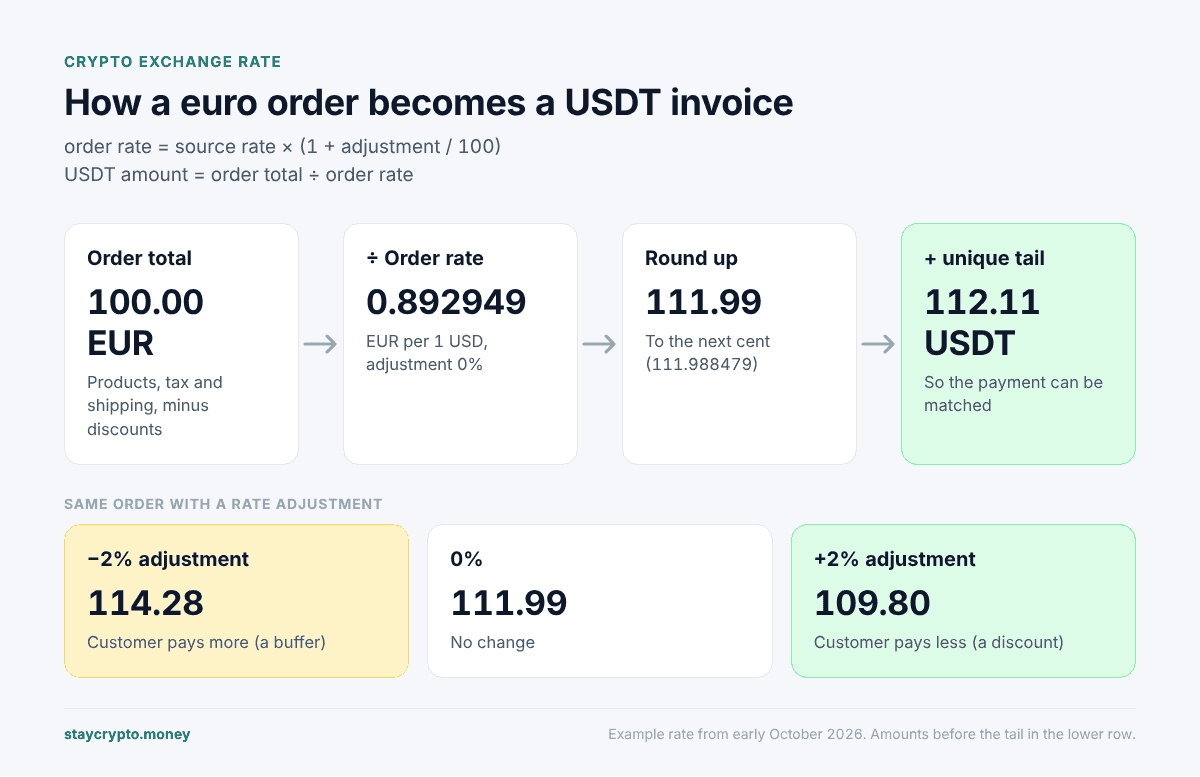
order rate  = source rate × (1 + adjustment / 100)
USDT amount = order total ÷ order rate
The “source rate” is how many units of your currency one US dollar buys. For a euro store that is a number below 1, for example 0.89. The order total is the full WooCommerce total: products, tax and shipping, minus discounts.
A worked example with a rate of 0.892949 euros per dollar (close to the real rate in early October 2026):
- Order total: 100.00 EUR
- 100 ÷ 0.892949 = 111.988479
- Rounded up to the cent: 111.99 USDT
- Plus a unique tail of a few cents, for example 112.11 USDT (why the tail exists)
A store priced in USD skips the conversion. One USDT counts as one dollar.
One assumption sits under all of this: the plugin treats one USDT or USDC as exactly one dollar. It does not check the token’s market price. On normal days the difference is tiny. If a stablecoin ever drifts far from its peg, the plugin will not know.
Where the crypto exchange rate comes from
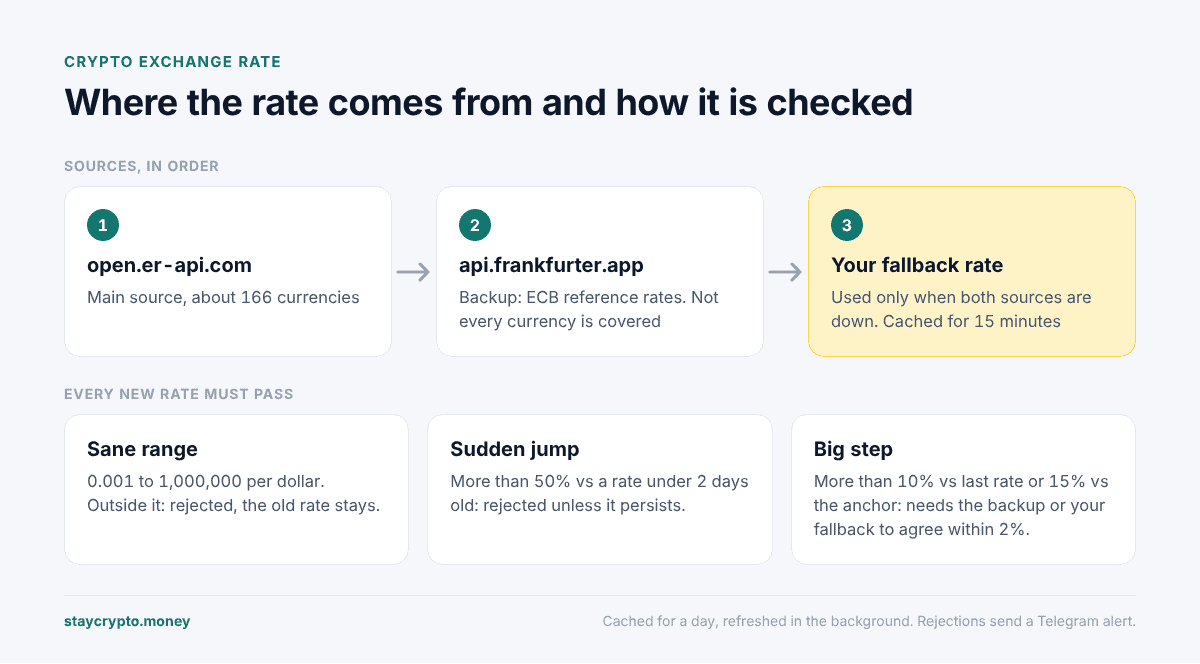
StayCrypto asks two free public services, in order:
- open.er-api.com, the main source, which publishes rates for about 166 currencies.
- api.frankfurter.app, the backup, which republishes the European Central Bank reference rates.
The only thing sent to them is your currency code. No order data, no customer data, no site address.
The rate is cached on your site for a day and refreshed in the background before it expires, so customers do not wait for it at checkout. The next refresh is timed to when the source publishes its next update, never sooner than 15 minutes and never later than 20 hours. If both sources fail, the plugin tries again in 15 minutes.
A gap worth knowing about
The backup only covers currencies the ECB publishes. When we checked in October 2026, it had no rate at all for the Kazakh tenge or the Ukrainian hryvnia. For currencies like these, there is effectively one source. If it goes down, the only thing that keeps checkout working is a fallback rate you set yourself (see below). Check your own currency once by opening https://api.frankfurter.app/latest?base=USD&symbols=XXX with your code instead of XXX.
The rate adjustment, and why its sign looks backwards
On the Status page you can set an adjustment between -20% and +20%. This is the setting store owners most often get the wrong way round:
- Plus makes the customer pay less. It raises the rate, and the rate divides the total.
- Minus makes the customer pay more. It works as a buffer.
On a 100 EUR order with the rate above:
| Adjustment | Order rate | Invoice (before tail) |
|---|---|---|
| -2% | 0.875090 | 114.28 USDT |
| 0% | 0.892949 | 111.99 USDT |
| +2% | 0.910808 | 109.80 USDT |
So “+3%” is a 3% discount for paying in crypto, not a markup. The Status page spells this out next to the field (“buyer pays a little less” or “a little more”), and it is worth reading before you save.
Changing the adjustment takes effect immediately and does not need a new rate download, because it is applied every time the cached rate is read.
The fallback rate
You can also enter a manual fallback: “1 USD = [ ] EUR”. It is only used when both sources are unavailable at the same time. While even one source answers, it does nothing.
When the fallback is in use, the Status page shows a warning that a manual rate is being used. The fallback is cached for only 15 minutes, so the plugin keeps checking whether the live sources are back. You get a Telegram alert (repeated every 6 hours) and an email (once a day), and a recovery message when things are normal again.
Three details matter:
- It belongs to one currency. If you switch your store from EUR to GBP, the saved EUR fallback is not applied to pounds. The Status page marks it as not being used.
- Typos are dangerous. Typing 920 instead of 0.92 would price a 100 EUR order at about ten cents. The plugin rejects numbers outside a sane range and warns if your figure is more than 20% from the live rate, but read the number twice anyway.
- It doubles as an anchor. It is also used to judge whether a sudden jump in the live rate is believable (next section).
3 proven safeguards against a bad crypto exchange rate
A free rate service can return garbage: a wrong decimal, a glitch, or something deliberate. A bad rate means wrong invoices, and a payment that matches a wrong invoice is exact as far as the plugin is concerned. The order closes and you lose money. So StayCrypto checks every new rate before using it:
| Check | Trigger | What happens |
|---|---|---|
| Sane range | Rate outside 0.001 to 1,000,000 per dollar | Rejected; the previous rate stays |
| Sudden jump | More than 50% change against a rate saved less than 2 days ago | Rejected; accepted later if it persists past 2 days |
| Big step | More than 10% from the last rate, or more than 15% from the anchor | Accepted only if the second source agrees within 2%, or your fallback agrees |
Each rejection keeps the last good rate in place and sends a Telegram message, at most every 6 hours.
The anchor check exists because of a slow-drift problem found in testing. A source that returned a rate 45% higher at each update walked a 100 EUR invoice down from 108.70 to 5.56 USDT in eight updates, without a single alert, because each step stayed under the jump limit and was only compared with the step before it. Comparing against a fixed reference stops that.
The flip side: for a currency with no backup source, a real move above 15% (a devaluation, say) cannot be confirmed automatically. The plugin keeps the old rate. If that happens, set a fallback rate that matches reality. It becomes the new anchor.
How to check the crypto exchange rate yourself
- Open StayCrypto → Status → Exchange rate and note the “Source rate” and how long ago it was updated.
- Open
https://open.er-api.com/v6/latest/USDin a browser and find your currency. - They should differ by a fraction of a percent at most, depending on update times.
If Status says “failed to fetch”, look at the staycrypto log in WooCommerce → Status → Logs. The “Refresh rate now” button forces a new fetch, but it can only be used once an hour.
New to stablecoin payments? Start with stablecoin payments for online stores.
FAQ
Do I have to change my prices to USD?
No. Keep your store currency. The conversion happens only on the crypto payment page.
Who can change the adjustment?
Shop managers can, as well as administrators. Wallet addresses, RPC nodes and Telegram settings are administrator-only. Keep that in mind when you give staff access, since the adjustment changes what customers pay.
Is the crypto exchange rate the same as my bank’s?
No. It is a mid-market reference rate. Your bank or exchange will apply its own rate and fees when you convert.
What does the customer see if no rate is available?
“Could not fetch the exchange rate right now. Try again in a minute.” The plugin never substitutes 1.0 for a missing rate, because for a euro store that would undercharge by about 10%.
Is there a minimum order?
Yes, the equivalent of one US dollar. Below that, the method is hidden at checkout.